1
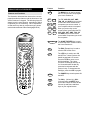
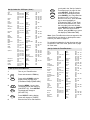
For example, enter a sequence that
will start your VCR recording your
DSS Satellite channel.
SETTING UP TIMED SEQUENCES RECORDING WHEN YOU ARE NOT HOME
The Home Producer 8 is equipped with a special
feature that lets the user set up a sequence of keystrokes that can be played back at a specified time,
up to seven days in advance. This feature can be
used to set up sequences that will record from your
DSS satellite, turn on your infrared home automation
lighting system when you are not home or any other
series of keystrokes that you would like to play back
at a later time. You can store up to a total of ten
sequences in the memory of the Home Producer 8
with each sequence having a maximum of 15
keystrokes For example, to set up the remote to
record a program off of your DSS Satellite:
1
MAGIC
SELECT
SELECT
2
0
or
9
MENUSELECT
3
MENUSELECT
4
MENUSELECT
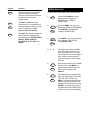
Press and hold MAGIC until the
display screen changes from [DEVICE and the TIME] to
[TIMED SEQ]. Press SELECT.
The display will change to [ADD
MACRO]. Press SELECT again.
The display will change to
[START and the TIME], with the first
digit of the TIME blinking. Enter either
a 0 or a 1, then the next digit in the
time will begin to blink, continue
entering the time until all four digits of
the time have been set. After the time
has been set, AM/PM will then blink.
Press MENU - to toggle between AM
and PM, once AM or PM is selected,
press SELECT.
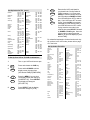
The display will then change to
[ONCE]. Use the MENU - key to
toggle between [ONCE], [DAILY] or
[WEEKLY], depending on when and
how often the sequence needs to
play. After [ONCE], [DAILY] or
[WEEKLY] is chosen, press SELECT.
The display will change to the day of
the week that you want the sequence to begin. Use MENU - to
toggle through the days of the week
until the proper day is on the display
screen. Press SELECT. The display
will change to [SELECT SEQ].
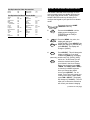
SAT + POWER + SAT + 2 + 7 + 5 +
VCR + POWER + VCR + RECORD.
This sequence will turn on the
DSS, change the channel to 275,
turn on the VCR and start the VCR
recording.
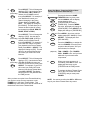
5
ESC
Once the sequence has been set
up, press the ESC key to return to
the [DEVICE and the TIME] display
screen. Below the [TIME], a
CLOCK ( ) symbol will appear to
show that there is a timed sequence
in the memory.
Note: If, at any time during the set up of your timed
sequence, a mistake is made, press the ESC key to
return to the main display [DEVICE and the TIME] .
Now, delete the sequence that was incorrect and
restart your timed sequence.
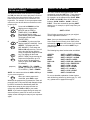
To Delete a Timed Sequence
1
MAGIC
SELECT
MENUSELECT
2
SELECT
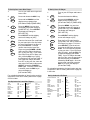
Press and hold MAGIC until the
display screen changes from
[DEVICE and the TIME] to
[TIMED SEQ]. Press SELECT. The
display will change to [ADD MACRO].
Press MENU - one time. The
display will change to [DEL MACRO].
Press SELECT.
The display will then change to
[DEL (the DAY or D for Daily or W
for WEEKLY) and (the TIME of the
Sequence)]. If this is the timed
sequence you would like to delete,
press SELECT. The display will
change to [DELETED] then return
to [DEVICE and the TIME].
Note: If you have more than one timed sequence
saved in the memory of the Home Producer, use the
MENU - key to scroll through your saved timed
sequences until you see the sequence you would
like to delete. Once the sequence is displayed on
the screen, press SELECT. The display will change
to [DELETED] then return to [DEVICE and the TIME].