1
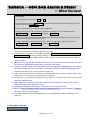
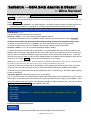
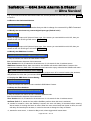
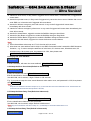
SafeBox ---GSM SMS Alarm & Dialer
-- Ultra Version!
Index
1.Brief introduction --------------------------------------3
2.Safety Directions --------------------------------------3
3.Standard Packing list ---------------------------------4
4.Main Features ----------------------------------------4
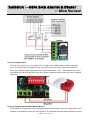
5.Installation and Connection Diagram -----------5
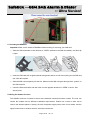
5.1 Inserting the SIMCard -----------------------------5
5.2 Using the Outlets for wires-------------------6
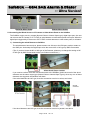
5.3Contacting the Wired Sensor,CCTV,IP Camera
or Other Alarm Panel to the SafeBox ----------6
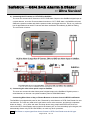
5.4Contacting the Wired Arm or Stay or Disarm
Buttons or Access Control & RFID Card
Reader ------------------------------------------------8
5.5Contacting the Siren -------------------10
5.6Contacting the Backup Battery ---------------10
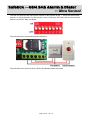
5.7Registering the wireless sensor ---------------11
5.8Contacting the External GSM Antenna ------15
5.9Contacting the AC/DC Power Supply---------15
5.10Switching on/off the SafeBox ----------------15
5.11Mounting the SafeBox -----------------------16
5.12Reset to Factory Default ----------------------16
6.Settings--------------------------------------------------16
6.1Setup New Password-----------------------------17
6.2Setup Authorized number----------------------18
6.3Inquiry the Authorized number-----------------18
6.4Remove the Authorized Number--------------18
6.5Modify the wired zone type----------------------19
6.6Modify the SMS Alarm Content------------------------19
6.7Inquiry the SMS Alarm Content Setting-------------19
6.8Setup the Zone Attribute -------------------------------19
6.9Inquiry the Zone Attribute------------------------------20
6.10Setup the Siren Sound time--------------------------20
6.11Setup the Alarm Delay Time--------------------------20
6.12Setup the Arm Delay Time----------------------------20
6.13Enable to Alert the first Authorized Number ---21
6.14Required the SafeBox callback----------------------21
6.15Setup External Power Status Alert Feature-------21
6.16Setup Siren Response Feature ---------------------22
7.Operating Instructions --------------------------------------22
7.1Operation by Remote Controls-------------------------22
7.2Armed or Stay WITH a FREE call --------------------23
7.3SMS Commands for Arm or Disarm or Switch
On/Off Siren. ----------------------------------------------23
7.4Inquiry Status and GSM Module IMEI Code--------24
7.5iOS App and Android Apps Instructions--------------24
8.Technical specifications-------------------------------------24
9. Maintenance----------------------------------------------------25
10.Warranty --------------------------------------------------------25
11.Affix Table------------------------------------------------------25
Table 1. SafeBox Installation Schedule-------------------26
Table 2. SafeBox SMS Command List---------------------27
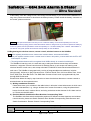
This handbook has been designed as a guide to the installation and operation of WASMS-SafeBox GSM
Alarm&Dialer.
Statements contained in the handbook are general guidelines only and in no way are designed to supersede the
instructions contained with other products.
We recommend that the advice of a registered electrician be sought before any Installation work commences.
The manufacturer, its employees and distributors, accept no liability for any loss or damage including consequential
damage due to reliance on any material contained in this handbook.
The manufacturer, its employees and distributors, accept no liability for GSM Network upgrading or SIMCard
upgrading due to the technology specifications contained in this handbook.
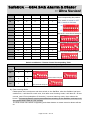
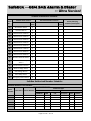
SMS Command List
SMS COMMAND
Functions & Actions
AA
To arm the SafeBox, in this mode, any detector triggered will alarm.
BB
To disarm the SafeBox, in this mode, detector triggered will not alarm.
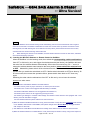
Very Important!
Please fill the
Installation
CC
To switch ON the Siren output.
Schedule at Page
DD
To switch OFF the Siren output
26 before
EE
Inquire the SafeBox Status and GSM Module IMEI Code.
programming it.
*The commands should add Password, the format is Password+SMS Command. i.e.: if the password is 1234, then
you can send 1234AA to arm, 1234BB to disarm, the AA~EE must be Caps Lock.
Page 2 of 28 Ver 1.0