1
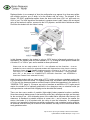
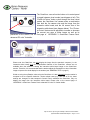
Displayed below is one example of how the configuration may appear for a three-way splitter
with multiple monitors, one of which is for the student with low vision. The diagram of the
Kramer “VP-300K” amplification-splitter shows the device with three VGA ‘out’ ports and one
VGA ‘in’ port. The VGA signal from the teacher’s computer tower is split 3-ways, with one signal
going to the teacher’s monitor, a second to the LCD projector, and the third to whichever model
of monitor the student with low vision is using.
OUT
TEACHER’S
MONITOR
IN
OUT
OUT
STUDENT’S
TEACHER’S
CPU TOWER
MONITOR
(CCTV OR
OTHER)
LCD PROJECTOR
(TO SMART BOARD
OR OTHER)
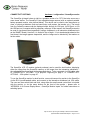
In this diagram example, the student is using a CCTV device (referenced previously as the
myReader). The student could use other models of CCTV, as long as his/her specific model has
a “monitor in” or “VGA in” port, and is enabled to allow split-screen.
Please note: the two major models of CCTV – the myReader and the ClearView+ – that are
available for loan to schools (for registered students with diagnosed low vision) from the Learning
Resources Centre are both capable of split-screen with a “monitor in” or “VGA in” port (see the
next section on “CONNECTIVITY OPTIONS: myReader” and “APPENDIX 1: Using myReader
with a PC”, or the section on “CONNECTIVITY OPTIONS: ClearView+” and “APPENDIX 3:
ClearView+ Feature Pack: advanced PC units”)
Aside from the student with low vision using a CCTV, he/she could use a standard monitor that
is likely available within the school. For optimal screen size, the student should be assessed by
a TVI; as well, the classroom teacher would still need to follow the suggestions in the section on
“GENERAL TIPS” (page 3). Of course, any style of monitors as well as the CCTV option would
require the student to be optimally positioned in the classroom near an electrical outlet (as
running extension cords are both a tripping and an electrical-fire hazard).
There are also some models of portable (light-weight) battery-operated monitors available.
Some have enough battery power to last an entire school day, recharge overnight, and be ready
for the next day’s use – thus eliminating some of the cable and/or electrical outlet issues in the
classroom. A drawback to portable monitors is screen size – and of course, the smaller the
screen, the harder it is for students with low vision to see the information. A rechargeable
monitor is not essential in the three-way splitter configuration, and a standard monitor requiring
an electrical outlet will work just as well for most students, and may be more economical than a
costly portable monitor.
Tips and Tricks: Improving Accessibility to Electronic Board Notes…
by Brenda Bentz and Niels Nicolajsen – Page 7 of 31