1
Houston Radar SS300 User Manual
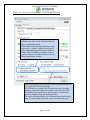
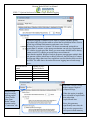
STEP 5: Set Detection Sensitivity
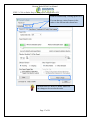
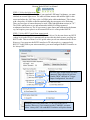
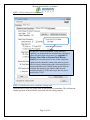
You can adjust the radar sensitivity via the
slider or the numeric up/dn. Typically the
sensitivity may need to be reduced if you
need to restrict the pickup range of the radar.
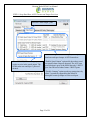
STEP 6: Set Detection Direction & Target Selector
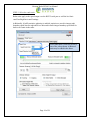
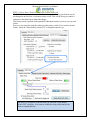
Detection Direction: Select “Incoming” for picking up approaching targets and
“Outgoing” for picking up receding targets. Both types cannot be selected.
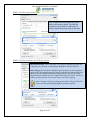
Select Target: The radar detects multiple targets internally, but only outputs the
speed of one. This setting instructs the radar to pick either the fastest speed or the
speed associated with the strongest return signal which is typically the closest
target but may be a farther one if it is significantly larger (E.g. truck). This has no
bearing on collected stats as all internal targets are used for logging.
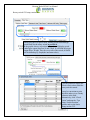
Select “Strongest” if you are picking up the wheels of large vehicles like
tractors or trucks and displaying higher speeds than expected.
Page 20 of 38