1
File Menu
The File drop-down menu contains two available choices: Print Setup and
Exit. Print Setup opens a standard Windows Printer Setup dialog box so that a
defined printer can be selected and the paper orientation, source, and size can
be set. Select Exit from the File menu to close Employee Scheduling.
Edit Menu
The Edit drop-down menu allows employee work schedules to be created,
copied and edited. If a schedule has not previously been created, the Edit
Schedule function is used to create a new schedule. If there are existing schedules in the system, a copy of one can be made to use as a future schedule.
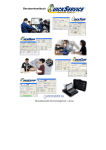
Changes and updates can be made to new schedules as well as existing or copied schedules. To access this feature, select Edit > Edit Schedule, as shown in
Figure 2-12:
Figure 2-12 Edit Schedule Selection
2 – 18
Functions
Aloha QuickService User’s Guide v5.3