1
Using the ML851 Viewer Software
4.
Click the Go button to load the settings. To also start logging, tick the
Start a New Recording box and then click Go.
(Note: if you are using the standard Windmill programs for real-time data
acquisition and control via the PC—Section4.3—use Windmill Chart, Logger or DDE Panel to send the hardware settings and not the ML851
Viewer.)
5.9
Returning to Real-Time Logging
on the PC with Windmill
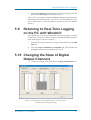
If you decide you want to log and chart data, and control outputs, on the PC
in real-time, you need to return to using the standard Windmill programs
rather than logging to the 851’s memory.
1.
As in the last section, Connect to a Logger or Site and choose the IMS
Files tab.
2.
Click the Prepare Windmill for SetupIML tab. This launches the
SetupIML program and reconfigures the system.
5.10 Changing the State of Digital
Output Channels
1.
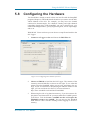
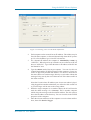
Connect to a Logger or Site and choose the Digout and Balance tab.
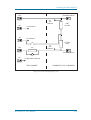
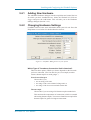
Figure 5.4 Changing the state of digital outputs, resetting counters
and balancing strain gauge bridges
Microlink 851 User Manual
5.7