1
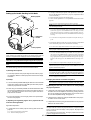
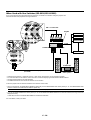
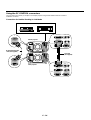
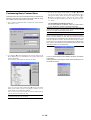
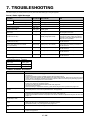
When Used with Two or More Switchers (100 Inputs)
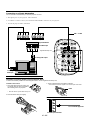
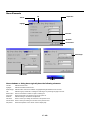
Up to 100 inputs can be accepted using the NEC ISS-6020 Switcher.
How to make connections:
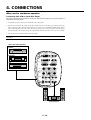
1 Connect the REMOTE 1 terminal of the master Switcher to the REMOTE 1 of the projector using the
optional control cable (15p-15p/CTL-6010).
2 Next connect the REMOTE 2 terminal of the master Switcher to the REMOTE 1 terminal of the first slave
Switcher using the same optional control cable as mentioned above. Third, connect the REMOTE 2 terminal of the first slave to the REMOTE 1 of the second slave, and the REMOTE 2 terminal of the second slave
to the REMOTE 1 terminal of the third slave (— and the REMOTE 2 of the ninth slave to the REMOTE 1 of
the tenth slave). Connect all the Switchers with optional control cables.
• Select [Projector Options] → [Switcher Control] → [SW2 Level]. See page E-51 for the information in detail.
• Refer to the user’s manual accompanying the Switcher.
• Cables mentioned are not included with the projector.
NOTE:
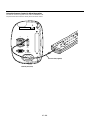
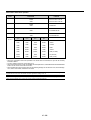
• Be sure to set all the slide switches (S8603) of the Switcher to RS-422 positions. Set the one on the last slave Switcher to
the appropriate position to match the connected equipment such as a personal computer. (RS-422/RS-232C for PC control
of projector)
• Set the DIP switch S8601 of the Switcher.
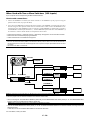
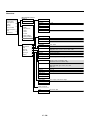
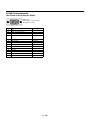
To RS232C
Personal
Computer
To REMOTE 1
To REMOTE 1
To REMOTE 2
To REMOTE 1
To REMOTE 2
To Slot 1
To Slot 2
To REMOTE 1
Slave 1
Slave 2
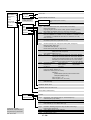
To REMOTE 2
To Slot 1-10
To Slot 1-10
To REMOTE 1
To Slot 10
To REMOTE 2
To REMOTE 1
Slave 10
To Slot 1-10
NOTE: The optional remote control RC-6320 for ISS-6020 will not work correctly in the SW Level 1 or 2 mode.
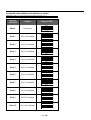
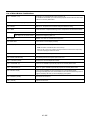
To use the projector with the Switcher ISS-6020 in the Switcher Control mode,
* When connecting with the VIDEO INPUT MODULE (6020-VID), set the VIDEO MODE select switch (S3001) to "8". The VIDEO MODE select
switch is located on the VIDEO INPUT MODULE (6020-VID).
NOTE: While in the Switcher Control mode, a video standard is selected at the projector.
* If you set the VIDEO MODE select switch (S3001) to "8" with the QUAD DECODER installed in the Switcher ISS-6020, the image will not be
displayed correctly.
In that case, first remove the QUAD DECODER from the Switcher ISS-6020.
For more details, contact your dealer.
E – 29