1
OPERATION
With an external USB mass storage device connected to either USB Front
or USB Back input, MP3, WMA or FLAC files or folders will be shown in the
touch panel display. Select desired file to playback.
FRANÇAIS
MONO
• Use “Mono” listening mode when the audio source format is mono. The
mono information is replicated on both left and right channels.
• “Mono” listening mode is recommended when watching old movies
with mono soundtrack, listening to recorded monaural sound sources
such as AM radio broadcasts or with the foreign language soundtracks
recorded in the left and right channels of some movies.
• Mono is also very helpful when setting up a stereo system to check that
both speakers are connected with correct polarity. Correctly connected
speakers will have a solid center image and strong bass response. If one
speaker has the input connections (+ and -) reversed, the image will be
indistinct and the bass will be reduced and uneven sounding.
REVERSED
• Sends the right channel to the left speaker and the left channel to the
right speaker. This can easily correct a reversed input connection or
incorrectly recorded music source.
POLARITY
Allow compensation for recordings that have reversed polarity.
• Positive: A positive sine wave at the input remains positive at the
output. Polarity is defaulted to “Positive” setting.
• Negative: A positive sine wave at the input is negative (inverted) or
reversed at the output.
ESPAÑOL
STEREO
• Select “Stereo” when you wish to listen to a stereo production, such as
music CD or FM broadcast.
• Stereo recordings whether in PCM/digital or analog form and whether
surround-encoded or not encoded, are reproduced as recorded.
• Multi-channel digital recordings (Dolby Digital and DTS) are reproduced
in “Stereo Downmix” mode via the left and right speakers only.
ITALIANO
MEDIA
“Media” becomes accessible only when the selected Source is “USB Front”
or “USB Back”. If no external USB mass storage device is connected to USB
Front or USB Back input, “Please Insert Device” will be shown in the touch
panel display.
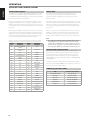
The M12 offers distinct listening modes, tailored for different types of
recording or program material. The following listening modes can be
selected.
DEUTSCH
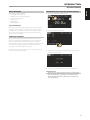
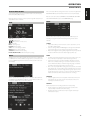
Coax 1: Current Source.
-20.0 dB: Volume level.
: Go to previous or next Source.
48k: Sample rate.
Mono: Listening mode.
Negative: Polarity setting.
Tone: Tone control settings enabled.
Balance: Balance settings enabled.
Sub Stereo: Subwoofer mode setting.
LPF 200Hz, HPF 200Hz: Subwoofer frequency setting.
MODE
NEDERLANDS
MAIN
Refer also to the items about “USB MODE” and “LISTENING TO USB DEVICE”
at the “OTHER FEATURES” section of the “OPERATION” page.
SVENSKA
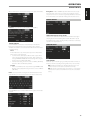
Below are sample screenshots of these options along with descriptions of
applicable functions or features.
If the connected USB mass storage device does not contain any applicable
MP3/WMA/FLAC files, “No files” will be shown in the touch panel display.
РУССКИЙ
DISPLAY MENU OPTIONS
The following display options are accessible via the touch panel display Main, Media, Mode, EQ and Setup.
ENGLISH
USING THE M12
11