1
ACCEssORIES
THE BAsICS
⒌
荻
us凵
卩 忤和 Ⅱ
0Ⅱ 吓 f
呷 θ态
| 锶
u
|一 挫
口 凹 ∴中
幻 00∷ 纟
WATERPRooF Ho∪ sING
∪p/P ayback Bu仗 on
Select/shutter Button
L__~__
Down/WⅡ F8utton
M0UNTING YOUR CAMERA
Attach your calη era to helrnets`gearand equipment
〓
躐
幔‰ +酵
卩 +0+rrJ,<+。 ∴ 飞
珏
Ⅱ嬷
坛
曜鏖
Ⅱ +o+rrJJK二
=诏
+
+
汁
¤谲
、
Ξ
珲
+镲 =刂俨
=
0+Ⅱ <ψ毋邛k
〓
浅
∷
恣∴
邕
翳鬓
+
0
o
£里 望 墅
+0
泅
o
躐噶 曜 噶
蜘 +凹 =瑟 0
+囔 =璩
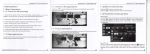
GETTING sTARTED
甲
HELL0
man∪ a|w"help you|earn the basics of
captvring|ife′ s rn° st incredib丨
Record\/deo
vide°
0Photo
Congratv|ations on yovr neˇ ˇcamera!This vser
T° p°
=`艹
ρowcr/Modo Buu° n
e moments!
到
%
Bv阝 t
Ⅱ
me
wer0N:
Capture a sing|e photo
Ph° t°
hp$e 1;fⅠ J展 l∶ ∶
盛:1:t“
Adlvst camera setungs`
Pressthe Power/M° de Bvtton
To powerOFF:
Captvre photo bvrsts
resolution and more
`setun吵
Press and ho|d the Power/Mode Button
sETTINGs
oVERVIEW
鹘→
翎ˉ
鹘→
鹘
蹶→
Tvrn camera ON and repeated|y press the
Press the shvtter`seIect Bvtton to enterthe
PoWer/Mode Bvtt° n to cyde thrOugh camera
settings menv Repeatedly press the
modes and sett ngs The modes wiH appearin
PoⅥ
foHowing order∶
and press the shvtter`select Bvtton to se|ect
逻→
鼹→
口
鳢→
礓→
desired option 0rvse the Vp`PIayback or
`e〃
Mode Button to cycle throvgh opt ons
DoˇVn/Wiˉ Fi Bvtton to cyc{e throvgh the
Var o∪ s options
Video ResoIvtion:△ o8op3ofps//2op6ofps
MicrosD Card
ェ
o8op3ofps
32cB
240m lns
△6GB
72op6ofps
320m Ins
△6o mins
8GB
6o m ns
8o mIns
⒋GB
3o m ns
40‘ η ns
UPside Down∶ On/O仟
screen saveⅡ ○ff/△ min/3minsl5mins
Powersaver O仰 ェminl3mins/5mins
This camera automaticaHy stops recording when
the battery is oVt of p° wer Yovr Video wi"be
saved before the Camera powers OFF
Format No/Yes
Reset:No/Yes
PHOTO MODE
TIME LAPsE MODE
0Photo
qh△ me
To capt∪ re a Photo`veHfythe camera s n
To captvre a Time Lapse seHes`veHfy the
Photo mode |fthe Photoicon on yo∪ rCamera′ 5
LCD5creen i$not shoWing`press the Powe〃
camerais n Time Lapse mode fthe Time
VersIon
VIDEO MODE
Looping Video:0仟 /0n
Time stamp∶ OfflDate/Date&Time
ExPosure:+-2o/+-△ 7/+-△ 3/+-△ o/+-o7/+ˉ o3/o
Photo ResoIution∶ △2M/8M/sM/2M
To record Videojvenfy the cameraisin
Bvrst Photo∶
mode
3Photos
Time Lapse0ffl2$/3$/5s/△ os/2° s/3os/6os
Continvovs Lapse∶ 0仟 /On
口
vide°
Ⅵ deo
丨
fthe Video icon on yoVrcamera′
BVtton repeated|y unt" t appears
To start recording:
Pressthe shvtter/seIect Button The ca丨
POltuguese/Dvtch/P° lish/Russian/
Japanese
emit one beep and the Camera statVs Lights wiH
ηera Ⅵ
/"
flash wh"e recording
Date&△ me:MM`DD/Y、 YY/MM/DD`
°rDD/MM/YY
V°
vme
o/△ /2/3
Pre$s the shvtter`seIect Bvtton The camera
2`3`5J!0`20`300r6° seCond intervals
tthe camera sh∪ tter soVnd
To takeTime Lapse:
BURST PHOTO MODE
到
Bv阝 t Ph°
Press the shvtter`seIect Bvtton The calη
b
3 Repeatedly press the Power`M° de Bvtton
to cyc|e throvgh camera rn° des
4 Press the shvtter/seIect Button
5 T° exit`h0|d down the shvtter/select
BVtton forthree seconds
shuttersovnd each time a Photo is taken
cameraisin BVrst Photo mode lfthe Bvrst
Photoicon on yovrcamera′ s LCD screen is not
statvs Lights stop nashing and the camera em ts
showinq`prOssthe POwer/Mode Bvtton
one beep to indicate recording
repeated|y vnt|it appears In BVrst Photo
has stopped
nlode`your ctln、 era takes3photosin⊥ 5
CAMERA APP
Thi$cameraiscompat b e wⅡ h4GB`王 6GB`
and32GB caρ acity microsD`microsDHC`and
m∶ crosDXC memory cards Yo∪
mvst vse a
Connecting tothe ismart DVApp(VViˉ
sρ eed
ratng We
recommend vsing brand name rnemory cards
PLAYBACK
△Ve"fythe cameraisin Camera modes
2 Press and hold the shvtte〃 seIect Bvtton
Fi Bv枝 on for
smartphone5and tab|ets"sted below
Theismart DV Aρ ρ|ets you contro|your
Camera remote|y vsing a smartphone or
et Featvresinclude fv"camera contro1
For Apple iOs∶
*iPhone5j5s`6E16Plvs(iOs8)
activities
hve previeˇ v`photo p|ayback and sharing of
*iPad Air&Mini(iOs8)
se|ect content and more
For Android:
*Android4X0uad-core devices
r
smartph。 ne ortab et atthe AppIe App
store or Google PIay
To charge the badeΓ
to cycle through、
`ideo and
Phototo$e|eCt
Button
牟Pressthe shvtter/select
desired opt on
/∶
3Make surethe camera s n Camera modes
2The Charging statvs Light remains ON
4 Pressthe Down/VViˉ Fi Bvtton to tVrn on
3 The Chargin9status Light vv"tvrn OFF
Fi
n$
6Press the shv汶 er`seIect Button
7I0retVrn to the Playback rnenvJ pre$s
thePowe〃 Mode Button
8To exit`hold down the Up/Playback Bvtton
fortwo seconds
2 Pressthe POwer/Mode Bvuonto power
△ Connectthe camera to a compvter or UsB
poˇ versvpp丨 y
wh"e the battery is chargin9
s opti°
iˉ
Fi
tab丨
Charging The Battoγ
3Repeatedly press the Power/M° de Bv∮ on
BVtton to CyCle throvgh the vario∪
№
咖№des mem
Theismart DV Appis compat ble w"h
Edition Only)
△ Down oadtheismart DV Appto yo∪
ayback menv
5Use Up`PIayback Bvtton or DoWn`Wiˉ
To ent姒
three seconds to t∪ rn OFFWiˉ Fi
BATTERY
P∶
碉
for maximvm re"ability in high-vibration
PIayin9Back、 ′ideos and Photos
To enterthe PIayback rnenv:
△VeHfy the cameraisin Camera modes
2Pressthe Vp`PIayback Button to enterthe
QUICK MODEs
*Press and hold the Down^″
sTORAGE/MICROsD CARDS
microsD card vvith a CIass△ o
era
initiates coVntdown and enη its the camera
secOnds
forthree seconds
Lapseicon on yovrcamera′ $LCD screen is not
showing`ρ ress the PowerrM0de Bvu。 n
repeatedly unt"it appears ln Tinne Lapse mode`
Press the shutter/seIect Bvtton The Carnera
To stop reCording:
Lapse
yovr Camera captvres a series of photos at
To captve a BVrst Photo serle5j Verify the
sound lndicator∶ shvtter○ n/○ 凡 start Uρ △
/2/3/
Pre$sthe shutter/seIect Button The camera
en1it camera shV痰 ersounds.
w"丨
To take a photo:
xAl l enη
Chinese/France/Spanish/丨 ta"an/
None`Beep0n/O几
it appear$
sLCD
screen is not showingj pre$$the Power`Mode
Power Freqvency:5oHz/6° Hz/A∪ t°
Language∶ Eng"sh/sirnp"雨 ed Chinese/Traditional
Mode Bvtton repeatedly vntⅡ
To take a Burst Photo series:
Ⅵ
`hen the battery is fuHy charged
*Charging Time∶
35h° ur$
camera ON
Wi Fi*
5 |n yo∪ rsmartphone ortab|et′
s、
V Fi
settin9s`connectto the net、Ⅳork caHed
“
sports Cam9″ fo"owed by a series of
COMPATlB丨 凵TY
*Compatibility varies by deVice C° ntent
nvrnbers
6 Enterthe password、 、
△23钅 56789o″
playbackj5haring and aCCess to the camera‘ s
7⊙ pentheismart DV App on yovr
devices
smartphone ortab|et
memory card might be not ava"ab丨
e onsome