1
USER MANUAL
IMPORTANT
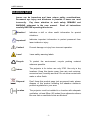
For your own safely and full laser safety
regulation, we do strongly recommend
you to take this optional switch!
CONTROL & FUNCTION
z
z
z
z
Regular breaks during operation are essential to maximize the life of this
device as it is not designed for continual use.
Do not switch the unit on and off in short time intervals
Always unplug the unit when it is not used for a longer time. Or before
replacing the bulb or start servicing.
In the event of serious operation problems, stop using the fixture and
contact your dealer immediately.
Attention
Laser will be output from laser aperture in 5 seconds
after the unit is powered on.
Operating Mode
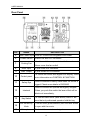
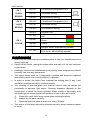
When laser is powered on, LED monitor on rear panel shows the current
operating standalone mode or DMX address of DMX mode. With help of LED
control panel, it is very easy to set and change the operating mode of laser. After
every resetting and saved, the new mode information will be shown on LED
monitor at next power on.
Mode/Function Option, to choose the operating mode of laser.
Confirmation, to confirm all setting or change of LED control panel.
UP/DOWN, to change operating mode, parameter or DMX address.
16