1
User Manual
English
Introduction
User Manual
English
Overview
Thank you for purchasing this LINDY HDMI Video Wall over IP Extender. This HDMI Extender allows you
to distribute an HDMI signal up to 1080p via Ethernet network to multiple displays for applications
such as digital signage, public display and large scale presentations. These extenders convert the HDMI
signal to IP broadcast signals. Network devices can be used to distribute the signals. These extenders
support 1-to-1, 1-to-many, many-to-many and video wall (2x2 up to 8x8) configurations, with Transmitters
and Receivers available separately to give you the maximum flexibility in your installation.
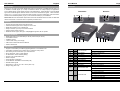
Transmitter
T4 T10 T3 T2
Receiver
T1
R4 R10 R3 R2
R1
Please Note: Because of bandwidth requirements these video broadcasts should use their own dedicated
network connections or should be used in a separate port based VLAN.
Features
•
•
•
•
•
•
Supports Unicast, Multicast and Video Wall modes
Video Wall mode supports screen arrays from 2x2 to 8x8
HDMI signal extension over a Gigabit LAN
Ability to cascade up to 3 layers of network switches
Features Video Tearing correction
HDMI with HDCP support, 480p up to 1080p60@8bit supported, 3D not capable
Package Contents
•
•
•
•
•
•
HDMI Video Wall over IP Transmitter (No. 38132) or Receiver (No. 38133)
2x Installation bracket
Installation screws
12V DC Multi-country power supply
LINDY Quick Install Guide and User Manual
Generic Software CD
T5
T6 T7 T8
T9
R5
R6
R7 R8
R9
Specification
•
•
•
•
•
•
•
•
•
•
•
•
Supports 4 Transmitters per IGMP equipped Gigabit Hub or Port Based VLAN
Transmitters and Receivers are paired using a 16 selection rotary switch
Each Pairing can be broadcast to up to 1000 Receivers
HDTV resolutions: 720p to 1080p @ 60Hz
PC Resolutions: XGA to WUXGA (1200p)
Supports 2 CH LPCM HDMI Audio
HDCP Compliant
Automatic EDID configuration
Control Method: Serial RS232 or Web GUI (LAN)
Extends RS232 signals
Dimensions (H x W x D): 25 x 96 x 130mm (each unit)
Weight: 500g (each unit)
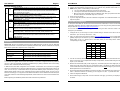
T1
R1
Video Connector
Connect to the HDMI Source
Connect to the HDMI Monitor
T2
R2
RJ45 Socket
Connect to a Gigabit Hub
T3
R3
Reset Button
Reboots the unit
T4
R4
Power Supply
T5
R5
F2 Push Button
T6
R6
F1 Push Button
T7
R7
Rotary Switch
Set pairing values
T8
R8
Serial Port 1
For system control
T9
R9
Serial Port 2
T10
R10
Network Status LED
Please see the Function Button section
For data communication
Flashing: Connected to a network
Off: No network connection
Green: No Link with Receiver
T11
Blue: Linked to Receiver
Power/Link LED
R11
Flashing Blue & Green: Linked but no input video signal
Red: No Link with Transmitter
Blue: Linked to Transmitter
Flashing Blue &Red: Linked but no input video signal