1
SVM 25E / SVM25P
ADJUSTMENT OF STRAIGHTNESS
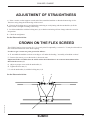
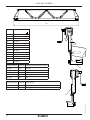
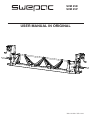
A. Place a trestle or other support at each end of the assembled machine so that the bottom edge is free.
Tension a string along the bottom edge of the screed.
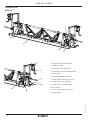
B. Unscrew the locking nuts (1) and adjust the tensioning at each jointing with the turnbuckle (2) till the
entire screed is straight according to the string.
C. Lock the turnbuckles with the locking nuts (1) so that the tensioning will not change when the screed is
in operation.
D. Check the straightness
See the illustration below.
CROWN ON THE FLEX SCREED
The SVM 25 can be given a crown of ± 5 % at each joint. Exceptionally, a crown of ± 7% may be achieved but
this would shorten the life of the shaft coupling.
In order to get a crown at a joint, proceed as follows:
A- E Assemble the modular sections according to A-F under the heading ”Assembly of modular sections”
F. Unscrew the nuts (4 pcs) on the inside (3) about one turn.
Important! If the screed has been in action earlier check that there is no concrete incrustation in the
thread of the screws (3).
G. Adjust to proper crown with the turnbuckle (2).
H. Tighten the four nuts (3).
I. Lock the turnbuckle (2) with the locking nut (1). 3
Dok: 101501C-GB 1441
See the illustration below.
1
2
3
13