1
operation2.book
Page 94
Wednesday, January 7, 2004
10:04 AM
Section 5
DETAILED SETTINGS
Hysteresis Setting
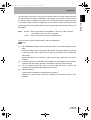
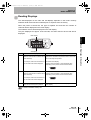
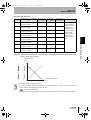
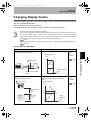
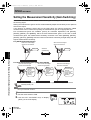
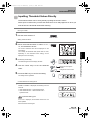
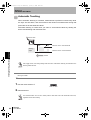
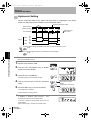
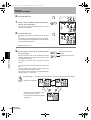
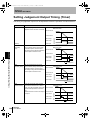
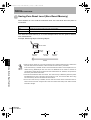
Set the hysteresis width for the upper and lower limits of judgements if the HIGH,
PASS, or LOW judgement is unstable near the threshold values.
HIGH threshold
Hysteresis (hysteresis width)
Measured value
Operation point
Return point
LOW threshold
Output
HIGH
ON
OFF
PASS
ON
OFF
LOW
ON
OFF
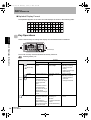
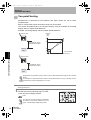
Hysteresis width settings are disabled when previous value comparison is used.
p.86
Section 5 Entering Threshold Values
To prevent self-trigger chattering, set hysteresis for the self-trigger.
p.78
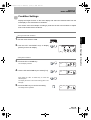
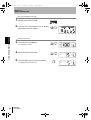
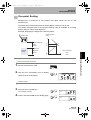
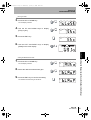
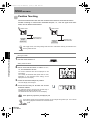
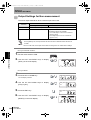
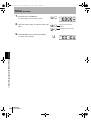
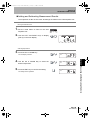
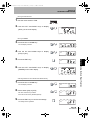
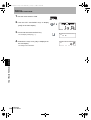
Moving to FUN Mode and HYS
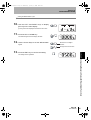
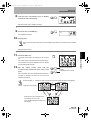
1. Set the mode switch to FUN.
2. Use the LEFT and RIGHT Keys to display
LD ON
ZERO
ENABLE
[HYS] on the main display.
(mm)
3. Press the UP or DOWN Key.
The leftmost digit of the sub-display will flash.
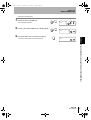
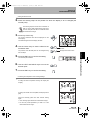
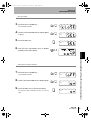
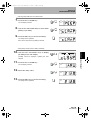
4. Use the Cursor Keys to enter the hysteresis
width.
SUB
Moves from one digit to
another.
Changes the current value.
5. Press the ENT Key to confirm the setting.
The setting will be registered.
SUB
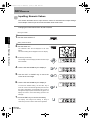
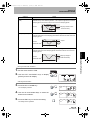
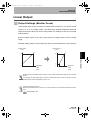
Countermeasures for Setting Errors
If [ERROV] is displayed, [HIGH threshold – LOW
threshold] is smaller than the hysteresis width.
If an error is displayed, the threshold values have not
been updated.
Set the values again or change the threshold values.
94
ZX-L-N
User’s Manual
SUB