1
Application Icons
Application Icons
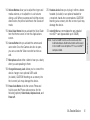
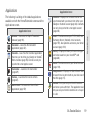
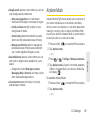
Maps – Launches a dynamic map that helps
you find local businesses, locate friends, view
maps and get driving directions (page 120).
Sprint ID – Launches the Sprint ID application
from where you can replace a current ID or get a
new one.
Market – Browse, search for, and download
applications on the Android Market (page 110).
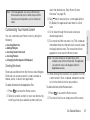
Sprint Zone – Accesses links to Sprint Zone
services like Account Information, What’s New,
recommended Android applications, and other
promotional content (page 113).
Messaging – Provides access to your text
messages (page 84).
Music – Launches the built-in Music Player
(page 117).
Navigation – Launches the GPS Navigation
feature on your phone, allowing you to get quick
turn-by-turn directions.
News and Weather – Launches the application
that allows you to stay up to date on news and
weather.
Phone – Accesses the phone keypad (page 28).
Places – Allows others to find your business on
local search results using either Google Search
or Google Maps.
Settings – Accesses the device’s built-in
Settings menu (page 33).
20
1A. Device Basics
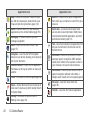
talk
Talk – Launches the Google Talk application that
lets you chat with family and friends over the
Internet for free.
Voice Dialer – Launches your device’s built-in
automatic speech recognition (ASR) software,
called Voice Control, to dial a phone number in
your Contacts or to launch phone functions.
Voice Search – Launches your device’s built-in
speech recognition software and initiates a
Google search based on the recognized speech
Voicemail – Launches Visual Voicemail
(page 78).
YouTube – Launches the YouTube application.