1
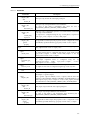
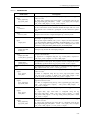
5.2 Remote Commands
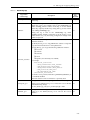
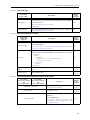
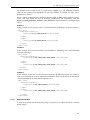
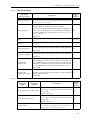
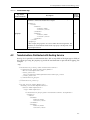
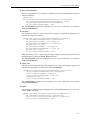
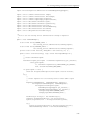
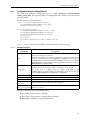
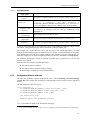
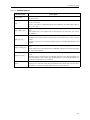
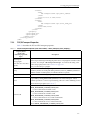
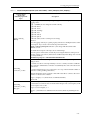
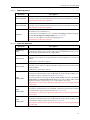
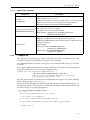
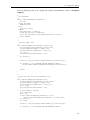
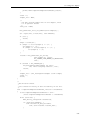
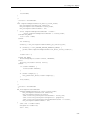
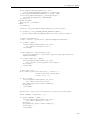
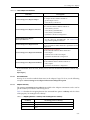
Table 5.1
Changeable Parameters
Mutable
(changeable any time)
Immutable
(only changeable when entity is disabled)1
Topic
Route
Mutable QoS policies in <datawriter_qos> and
<datareader_qos>
Mutable properties in
<transformation>/<property>
(transformation specific)
<route_types>
<propagate_dispose>
<propagate_unregister>
<publish_with_original_info>
<content_filter>/<parameter>
<entity_monitoring>/<enabled>
<entity_monitoring>/<status_publication_period>
Immutable QoS policies in <datawriter_qos> and
<datareader_qos>
<creation_mode>
<content_filter>/<expression>
<entity_monitoring>/<statistics_sampling_period>
<entity_monitoring>/<historical_statistics>
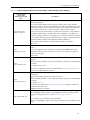
Auto
Route
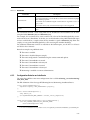
Mutable properties in <property> (adapter specific)
Immutable properties in <property>
(adapter specific)
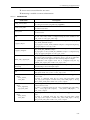
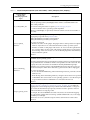
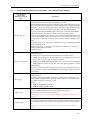
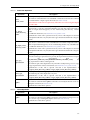
Auto
Topic
Route
Mutable QoS policies in <datawriter_qos> and
<datareader_qos>
<propagate_dispose>
<propagate_unregister>
<publish_with_original_info>
<content_filter>/<parameter>
<entity_monitoring>/<enabled>
<entity_monitoring>/<status_publication_period>
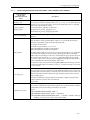
Immutable QoS policies in <datawriter_qos> and
<datareader_qos>
<creation_mode>
<allow_topic_name_filter>
<allow_registered_type_name_filter>
<deny_topic_name_filter>
<deny_registered_type_name_filter>
<content_filter>/<expression>
<entity_monitoring>/<statistics_sampling_period>
<entity_monitoring>/<historical_statistics>
Entity
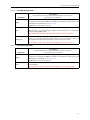
1. Monitoring parameters can also be changed when monitoring is disabled (even when the entity is enabled).
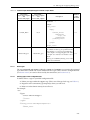
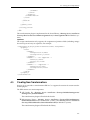
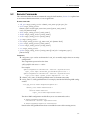
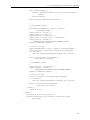
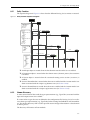
If you try to change an immutable parameter in an entity that is enabled, you will receive an
error message. To change an immutable parameter, you must disable the routing service entity,
change the parameter, and then enable the routing service entity again.
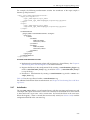
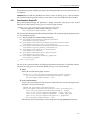
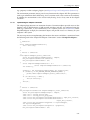
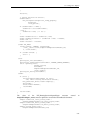
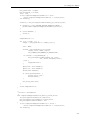
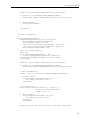
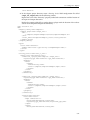
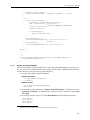
You can send an XML snippet (or an assignment expression) that only contains the values you
want to change for that entity, or you can send a whole well-formed configuration file.
❏ If you send an XML snippet (or an assignment expression), only the changes you specify
will take effect.
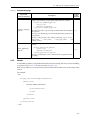
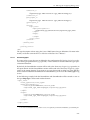
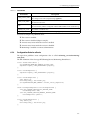
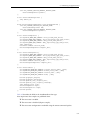
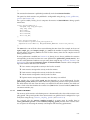
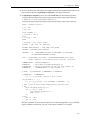
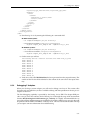
For example, suppose you send this command:
update ShapeRouter DomainRoute1::Session1::SquareToCircles
str://"<topic_route><input><datareader_qos><deadline><period>
<sec>1</sec></period></deadline></datareader_qos></input>
</topic_route>"
or
update ShapeRouter DomainRoute1::Session1::SquareToCircles
topic_route.input.datareader_qos.deadline.period.sec = 1
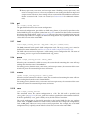
The topic route DomainRoute1::Session1::SquareToCircles will only change the period
value in the Deadline QoS for that particular DataReader.
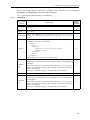
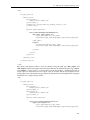
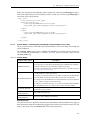
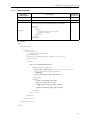
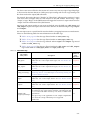
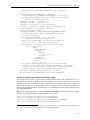
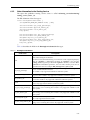
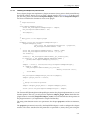
Now suppose that later on you send this command:
update ShapeRouter DomainRoute1::Session1::SquareToCircles
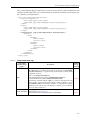
str://"<topic_route><input><datareader_qos><property>
5-7