1
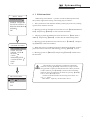
Function setting
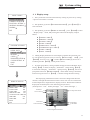
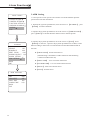
MAIN MENU
SYSTEM SETTING
CAMERA SETTING
FUNCTION SETTING
WINDOW BLANKING
ALARMS
EXIT
6. 7 Set auto-tracking
When initiate Auto tracking function, the speed dome automatically captures
the picture of the moving object, thus real-timely tracking.
1.Call 95 preset or call 9 preset twice within 3 seconds, input password to enter the
main menu.
2.Operate the joystick to move the cursor to 【FUNCTION SETTING】, press
【OPEN】to enter the next menu.
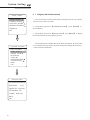
3.Operate the joystick to move the cursor to 【AUTO TRACKING】, press
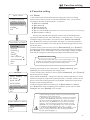
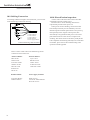
【OPEN】to enter the next menu, as showed on the left picture.
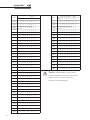
FUNCTION SETTING
PRESETS
SCAN
PATTERNS
TOUR
ZONES
TIME RUNNING
AUTO TRACKING
BACK
EXIT
4. Set left limit of the motion detection area: operate the joystick to
【SET LEFT LIMIT】, press【OPEN】, operate joystick to the target position,
then press【OPEN】to save. Set right limit of the motion detection area: operate
the joystick to【SET RIGHT LIMIT】, press【OPEN】, operate joystick to the
target position, then press【OPEN】to save.When the left & right limit is set at
the same point, the speed dome will track the moving object with pan 360°area.
5. Set upper limit of the motion detection area: operate the joystick to
【SET UP LIMIT】, press【OPEN】, operate joystick to the target position,
then press【OPEN】to save. Set down limit of the motion detection area: operate
the joystick to【SET DOWN LIMIT】, press【OPEN】, operate joystick to the
target position, then press【OPEN】to save.When the up & down limit is set at
the same point, the speed dome will track the moving object within tilt 360°area.
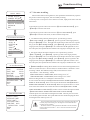
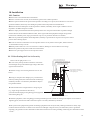
AUTO TRACKING
DAY
THU
STATE
OFF/TIME
START TIME
00:00
END TIME
00:00
SENSITIVE
MID
TRACKING-ZOOM OFF
TRACKING-SPEED MID
TRACKING PARA
BACK
EXIT
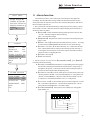
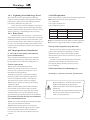
TRACKING PARA
SET LEFT LIMET
SET RIGHT LIMET
SET UP LIMET
SET DOWN LIMET
PAPK TIME 000s
PAPK ACTION NONE
BACK
EXIT
6.【PARK TIME】The setting allows PTZ to execute the next designated action
after it is in idle state (for 1-240 seconds) on condition that it is under the“Auto
Tracking”Mode. The default setting is 000, which means no action.
A)Under the “Auto Tracking” Mode.
b)TRACKING PARA→PARK TIME, which setting is not“0”
c)TRACKING PARA→PARK TIME, which setting is not“none”
When reaching the above 3 conditions at the same time:
It will execute the function under【TRACKING PARA→PARK TIME 000S
PARK ACTION NONE】, but it won't execute the function under【MOTION→
PARK TIME 000 PARK ACTION NONE】.When can't reach the above 3 conditions at the same time:It will execute the function under【MOTION→PARK
TIME 000 PARK ACTION NONE】, but but it won't execute the function under
【TRACKING PARA→PARK TIME 000S PARK ACTION NONE】
Call 250 preset to set the Auto Tracking function ON. Call 251 preset to set the
Auto Tracking function OFF. The speed dome will not resume keeping the Auto
Tracking function when it power on.
NOTICE
The speed dome will track the moving object at random when there are
too many objects in tracking area. Too light or too dark will influence
the effect of auto tracking.
The function relates to the speed dome and build-in camera modules;
the item will not be showed or “N/A”when the camera doesn't have
such function.
33