1
INSTALLING ADAPTER CARDS
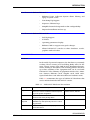
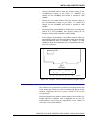
NOTE: The “Host Adapter SCSI Termination” should be DISABLED
if the SCSI card interfaces to both the internal hard disk and external
optical disk drives.
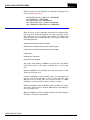
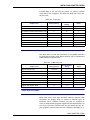
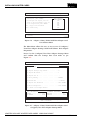
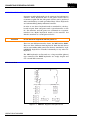
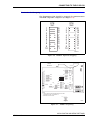
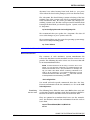
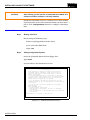
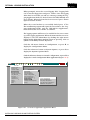
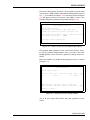
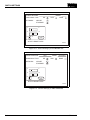
From the Configure/View Host Adapter Settings Menu, proceed to the SCSI Device Configuration sub-menu and confirm
for SCSI Device ID's #0 to #7 that the settings have been made
as per Figure 2-8.
Adaptec AHA-1540C/1542C SCSI Select (TM) Utility v1 01
AHA 1540C/1542C SCSI at port 342h
Configuration
Host Adapter Interrupt (IRQ) Channel. . . . . . . . . 11
Host Adapter DMA Channel. . . . . . . . . . . . . . . 5
SCSI DEVICE CONFIGURATION
Host Adapter SCSI ID. . . . . . . . . . . . . . . . . 7
SCSI DEVICE
#0
#1
#2
#3
#4
#5
#6
#7
SCSI Parity Checking. . . . . . . . . . . . . . . . . ENABLED
ENABLED SYNC NEGOTIATION no
no
no
no
no
no
no
no
DMA Transfer
Rate . . . yes
. . . yes
. . . yes
. . . yes
. . . yes
. . . yes
5.0 MB/SEC
ENABLED
DISCONNECTION
yes
yes
Options listed below have NO EFFECT if the BIOS is disabled
Host Adapter SCSI Termination . . . . . . . . . . . . Press <ENTER>
SEND
UNIT
COMMAND no. . .
no. . .
no. . .
no. . .
no. . Press
no
no
no
SCSISTART
Device
Configuration
<ENTER>
<F6> - Reset to Host Adaper Defaults
BIOS INFORMATION
REVISION. . . . . . . . . .1.01
BASE ADDRESS. . . . . . . .CC00h
FIRMWARE INFORMATION
REVISION. . . . . . . . . .01
CHECKSUM. . . . . . . . . .A3C2h
Arrow keys to move cursor, <ENTER> to select option, <ESC> to
exit (*=default)
GS960531
Figure 2-8. Adaptec 1540C/1542C SCSI Host Adapter Card
SCSI Device Configuration Menu
Press <Esc> to return to the Configure/View Host Adapter Settings Menu.
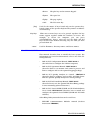
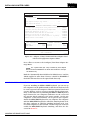
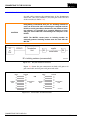
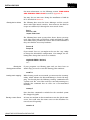
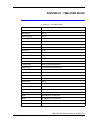
From the Configure/View Host Adapter Settings Menu, proceed to the Advanced Configuration Options sub-menu and
confirm that the settings have been made as per Figure 2-9.
I-E97-811-1C
ADAPTEC SCSI HOST ADAPTER CARD: MODEL 1540C/1542C/1542CF
2 - 15