1
VComm User's Manual, V1.54
system returns them to the sending application. IP applications often use this feature to test
the network interface.
6 Installation
VComm is currently installed with the V+ Visual Development System. See the V+
installation instructions. Future versions may be installed separately.
6.1
System Requirements
VComm requires Microsoft Windows 7. It is recommended that all critical updates be
installed along with all security updates including the latest service packs. In order to
support networked audio a full duplex sound card with the latest driver that supports
DirectX 9.0 or later is required, along with a full duplex PCI 100/10 network card.
6.2
Supported Hardware
Most sound cards will work with VComm including Bluetooth headsets and USB headsets.
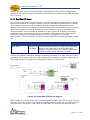
Note that SimPhonics provides a USB headset with built-in PTT. This headset is especially
handy for use with laptops. The SimPhonics H261 is shown in Figure 5. The sound card is
part of the headset.
Figure 5, SimPhonics USB PTT Headset
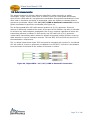
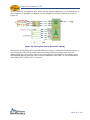
SimPhonics manufactures SMx systems which are used on higher end systems such a full
flight simulators. The SMx provides up to 64 channels of high end 24 bit audio. Figure 6
portrays the back of the SMx breakout box. For more information of the SMx system, see
the SMx User’s Manual.
Figure 6, SimPhonics SMx Breakout Box
Page 23 of 146