1
92
• Chapter 2 Installing the SystemEDGE Agent
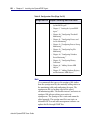
NOTE
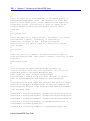
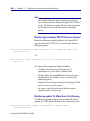
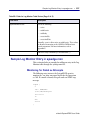
You can use the nroff command to view Man pages from
the command line if your Man path is not set correctly. To
do so, enter the following:
#nroff -man sysedge.1 | more
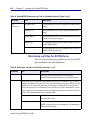
Directories and Files for Windows Systems
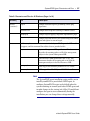
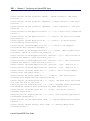
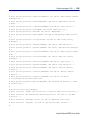
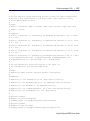
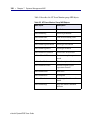
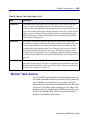
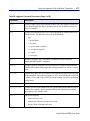
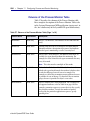
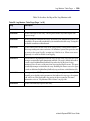
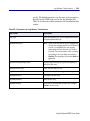
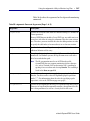
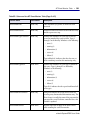
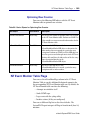
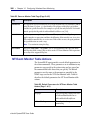
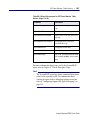
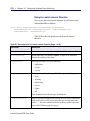
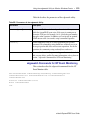
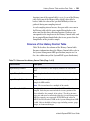
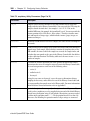
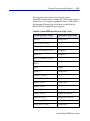
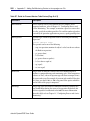
Table 8 describes the directories and files that the SystemEDGE
agent installation creates for Windows systems only.
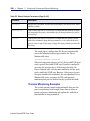
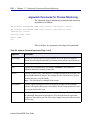
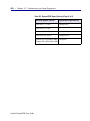
Table 8. SystemEDGE Directories and Files for Windows Systems (Page 1 of 3)
Directory
File
setup.exe
Command line version of the installation program for SystemEDGE.
NOTE:
Description
You do not need to use this file if you installed SystemEDGE through
InstallShield.
sysedge.cpl
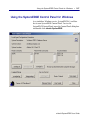
SystemEDGE Control Panel. You can use the SystemEDGE Control Panel to access
the configuration and log files, to run diagsysedge.exe, and to start and stop the
agent, but you do not have to use it for those tasks. You can also continue to perform
those tasks from the command line.
sysedge.dll
SystemEDGE agent dynamic link library.
sysedge.exe
SystemEDGE agent executable.
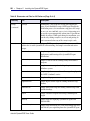
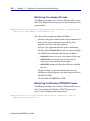
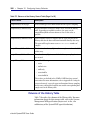
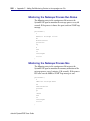
bin/
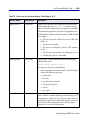
Subdirectory that contains the SystemEDGE agent dynamic link library, as well as
several command-line utilities for use with SystemEDGE threshold, process,
process group, log, and Windows event monitoring and history sampling.
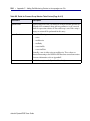
sendtrap.exe
Command-line utility for sending user-defined traps.
bounce.exe
Program for shutting down or rebooting Windows
systems. You can use this program as an extension or part
of an action script with SystemEDGE.
checkfile.exe
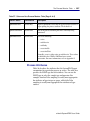
Program for checking whether a file exists. You can use
this program as an extension or part of an action script
with SystemEDGE.
eHealth SystemEDGE User Guide