1
9.4 CNC Connection
This connection is for use with CNC coilers. It is a high-density 9-pin D-sub connector. The
connector carries all the signals used on the various mechanical coiler control cables. With
CNC coilers a read signal must be sent to the Tiger to tell the gage when to read the spring
length. The Tiger sends signals to the coiler that the CNC software interprets and uses to
pitch adjust the spring length. The shutdown and sorter signals are there if the CNC coiler
manufacturer chooses to use them, but generally these functions are controlled with the
separate cables directly from the Tiger to the sorter or to shut down the coiler. See Section
17.4, for pinout details. (Connector is an option with Tiger 300 upgrade.)
9.5
Sorter Controls
The Tiger has connections for 3-Way and 5-Way sorters. These connect to any sorting
chute or air solenoid. The outputs are 115 VAC, 24 VAC, or 24 VDC. (5-way sort
connector is an option of the Tiger 300 upgrade.)
9.6 Pitch Adjuster
The Tiger has a separate connection for the Pitch Adjuster.
9.7 Shutdown Cable
This connector is for a Larson automatic shutdown cable (P/N 025-1000-0426). It provides
a set of normally closed relay contacts and a set of normally open relay contacts that switch
when a shutdown occurs. See Installing a Shutdown Cable, Section 4, for specific details.
9.8 USB Connection
The Tiger has a USB connection in case you would like to connect your tester to a
computer or printer. (The USB connector is an option if you bought a Tiger 300 upgrade.)
Version 1.0 software does not include a computer interface to the USB print connection.
10 ACTIVATION CODE
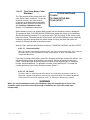
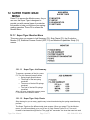
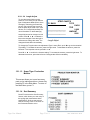
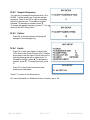
Each Tiger gage is shipped requiring an
activation code. LSI will provide an activation
code to you when full payment for the gage
has been received.
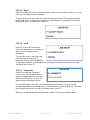
ACTIVATION
F1 ACTIVATE GAGE
1000.00 HOURS LEFT
SN 0000000000000000
F6 CONTINUE
This is the first screen you will see. To begin
using the gage immediately, press F6 Continue to get to the Main Menu. The Activation
screen allows you 1,000 hours of use. Without an activation code, the gage will cease to
function after 1,000 hours of use.
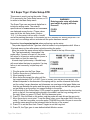
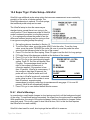
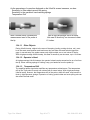
To enter your activation code, press F5 from the Main Menu to go to the Settings menu.
Press F2 to go to the Configuration menu. Press F3 to enter the code. Use or to scroll
through the character list. Use the left or right arrow to move the cursor from side to side.
Tiger User Manual
Page 17 of 71
060-1000-0091-00A