1
CONFIGURATION & INSTALLATION
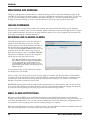
Unit Time
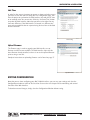
In order for the correct timestamp to appear on alarms and other events,
you must set the date and time using the Time configuration page. You
have the option to synchronize the Web Interface time with the PC time
or to manually enter the current time. Click the “Set Date/Time” button
to update the Web Interface. Note that you will need to adjust for any
time zone difference if the Web Interface is located in a different time
zone and you would like alarms reported using the local time at the Web
Interface location.
Time Config
Upload Firmware
The Firmware page is used to upgrade your Web Interface as new
firmware versions become available. The Web Interface ships with the
latest firmware already installed, so there is no need to upload firmware
prior to using a new unit.
Complete instructions on uploading firmware can be found on page 17.
Upload Firmware
EXITING CONFIGURATION
Now that you are done configuring your ARC-16 Web Interface, you can save your settings and close the
Configuration window to return to the Site View. Go on to the next chapter for the monitoring and control
functions of the Web Interface.
To abandon unsaved changes, simply close the Configuration Window without saving.
CUSTOMER SUPPORT: 978-486-3711 • support@burk.com • www.burk.com
11