1
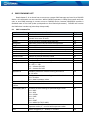
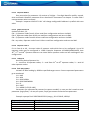
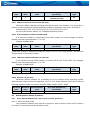
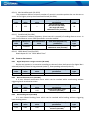
8.6.11.5 Geofence Zone #1 Longitude (X1) (ID=1033)
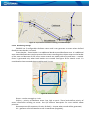
Parameter has two meanings dependent on zone shape. If shape is a rectangle, then
ID=10333 is left down corner X coordinate. If shape is a circle, then ID=1033 is center of that
circle X coordinate.
Sample value: 25.30528
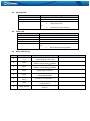
Minimum Maximum Recommended
Goes with (depends on)
Value
value
value
value
parameters
type
All Geofencing parameters
-180
180
Float
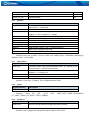
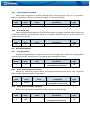
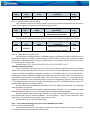
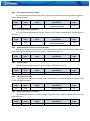
8.6.11.6 Geofence Zone #1 Latitude (Y1) (ID=1034)
Parameter has two meanings dependent on zone shape. If shape is a rectangle, then
ID=1034 is left down corner Y coordinate. If shape is a circle, then ID=1034 is center of that circle
Y coordinate.
Minimum Maximum Recommended
Goes with (depends on)
Value
value
value
value
parameters
type
All
Geofencing
parameters
-90
90
Float
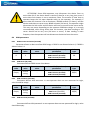
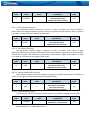
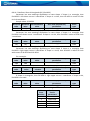
8.6.11.7 Geofence Zone #1 Longitude (X2) (ID=1035)
Parameter has two meanings depending on zone shape. If shape is a rectangle, then
ID=1035 is right upper corner X coordinate. If shape is a circle, then ID=1035 is radius of circle
with center of ID=1033 and ID=1034.
For rectangle:
Minimum Maximum Recommended
Goes with (depends on)
Value
value
value
value
parameters
type
All Geofencing parameters
-180
180
Float
For circle:
Minimum Maximum
Recommend
Goes with (depends on)
Value
value
value
ed value
parameters
type
All Geofencing parameters
0
1000000
1000
Float
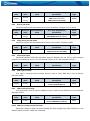
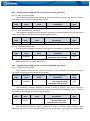
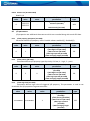
8.6.11.8 Geofence Zone #1 Latitude (Y2) (ID=1036)
If shape is rectangular, then ID=1036 is right upper corner Y coordinate. If shape circle,
ID=1036 is not used.
Minimum Maximum Recommended
Goes with (depends on)
Value
value
value
value
parameters
type
All Geofencing parameters
-90
90
Float
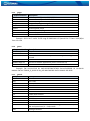
Other 4 GeoFence zone’s parameters have the same logic as shown in GeoFence Zone #1.
GeoFence
Zone
Number
1
2
3
4
5
Geofence
Zone’s
parameters
1030-1036
1040-1046
1050-1056
1060-1066
1070-1076