1
Others
Message List
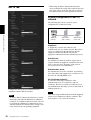
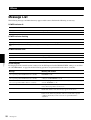
The following messages and indications may appear on this camera. Perform the following as necessary.
POWER indicator lit
NETWORK indicator
Camera status
Lights green
Operating normally
Unlit
Not connected to the network
POWER indicator flashing
NETWORK indicator
Camera status
Repeats green t yellow t orange
Software version is being upgraded
Repeats green t yellow t unlit t green t orange t
unlit
Initializing
POWER indicator unlit
NETWORK indicator
Camera status
Unlit
No power supplied
Lights green
Starting
Lights orange
Preparing to initialize
Others
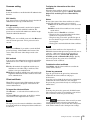
Screen display
It is displayed on the external monitor connected to the SDI output when the DISPLAY INFO setting is set to ON in
the “SYSTEM Menu” on page 56 and the following operations are performed from the remote controller.
58
Message
Meaning and solution
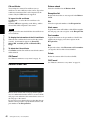
PRESET n OK
(“n” is a preset position number between 1 and 16.)
This message appears for about 3 seconds when you store camera settings to
POSITION 1 to 16.
RECALL n OK
(“n” is a preset position number between 1 and 16.)
This message appears for about 3 seconds when you read the camera
settings stored in POSITION 1 to 16.
RESET n OK
(“n” is a reset position number between 1 and 16.)
This message appears for about 3 seconds when you reset camera settings
stored in POSITION 1 to 16.
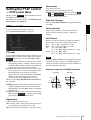
ONE PUSH WB:OP
During the white balance adjustment in the ONE PUSH white balance
mode, this message flashes on the screen.
ONE PUSH WB:OK
When the white balance adjustment has been done correctly in the ONE
PUSH white balance mode, this message appears on the screen.
ONE PUSH WB:NG
When the white balance adjustment has failed in the ONE PUSH white
balance mode, this message flashes on the screen. Check the exposure
condition and the subject and execute the one-push white balance
adjustment.
Message List