1
The display goes back to the Main Menu.
Main Menu / DMX Address
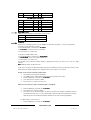
To set the DMX start address,
1. From the Main Menu, press Enter
2. Press the Up or Down buttons to adjust the DMX start address
3. Press Enter for 2 seconds to save and the display goes back to the Main Menu.
Control Mode
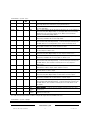
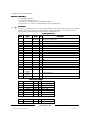
The PSU15 & PSU-300 can be set to operate in various DMX controlled and stand-alone modes in Color, Daylight,
Varywhite and PhosphorV systems with 3 grouping options (Single, Output and All). See menu options below.
In Control Mode, scroll through and select from the options available then save.
PSU15 System: Color
Mode
1
Name
fxHSI
2
3
4
5
6
7
8
9
10
11
HSI
RGB
RGBA
sRGBI
fxHSI
HSI
RGB
RGBA
sRGBI
fxHSI
12
13
14
15
16
17
HSI
RGB
RGBA
sRGBI
Look sel
Mastr
StandAlon
Slave
StandAlon
18
Group
Single/
Output/All
Single
Single
Single
Single
Output
Output
Output
Output
Output
All
Ch
52
All
All
All
All
All
3
3
4
5
1
Description
7fx + 15 x HSI (Grouping, Colour Speed, Fan, Range, Step,
Intensity Fx, Intensity Fan)
15 x HSI
15 x RGB (with *Magic Amber)
15 x RGBA
1s + 15 x RGBI
6fx + 3 x HSI
3 x HSI
3 x RGB (*with Magic Amber)
3 x RGBA
1s + 3 x RGBI
6fx + HSI (Colour Speed, Fan, Range, Step, Intensity Fx, Intensity
Fan)
HSI
RGB (with *Magic Amber)
RGBA
1s + RGBI
Look Select
Master Standalone
45
45
60
61
15
9
9
12
13
9
Slave Standalone
PSU15 System: Daylight
Mode
1
2
3
4
16
17
18
Name
Dim4x
Dim1x
Dim1x
FxDim
Look sel
Mastr StandAlon
Slave StandAlon
Group
Single
Single
All
All
All
Ch
60
15
1
2
1
Description
15 x CW CW CW CW
15 x CW
CW
Int Fx + CW
Look Select
Master Standalone
Slave Standalone
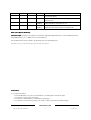
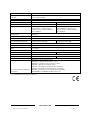
PSU15 System: Varywhite
Mode
1
Name
WW/CW
Group
Single
Ch
30
Description
15 x WW + 15 x CW
www.chroma-q.com
Studio Force D/V Compact User Manual
17
V1.7 June 2014