1
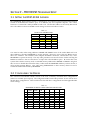
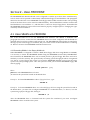
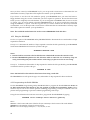
for drives A and B, and NONE installed for drives C and D. Next, you make a CONFIG.SYS file
containing the following:
DEVICE = DRIVER.SYS
/d:2
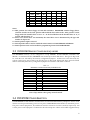
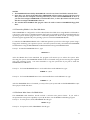
Example 2: To configure your system with a physical disk for drive A and PROMDISK drives B, C, D, you
must first set the configuration of your system CMOS or DIP switch to define a physical floppy disk
installed for drive A and NONE installed for drives B through D. Next, you make a CONFIG.SYS file
containing the following:
DEVICE = DRIVER.SYS
DEVICE = DRIVER.SYS
/d:2
/d:3
Notes: The above device drivers are only used when emulating floppy disks "C" and above.
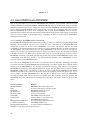
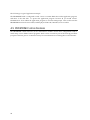
4.4 DYNAMIC DRIVE ASSIGNMENT
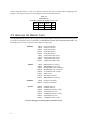
The PROMDISK board supports dynamic drive assignments for its three drives. This feature is
extremely useful during the development stages when the PROMDISK board is installed in a
development system with a different drive configuration than the final target system. The
PDASSIGN.COM software utility allows the user to reassign or even hide the PROMDISK drives. The
format for PDASSIGN is shown below:
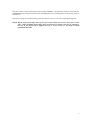
PDASSIGN {oldDrive}={newDrive}
Where:
{oldDrive} is the PROMDISK drive you wish to reassign.
{newDrive} is the letter A through Z for the new PROMDISK drive. Entering a dash (-) will hide the
drive until the system is rebooted.
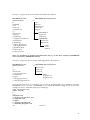
Notes:
1. PROMDISK fixed disk drives cannot be reassigned.
2. The reassign feature is disabled when the system is rebooted.
Example 1: To reassign PROMDISK drive A to B, type:
PDASSIGN A=B
Example 2: To reassign PROMDISK drive B to A, type:
PDASSIGN B=A
Example 3: To hide PROMDISK drive A, type:
PDASSIGN A=-
15