1
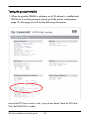
Symbol Set
Default value is 19U. If your country has its own characters please change this
value to the correct one. In some specific cases you need to install an optional
dimm font inside the printer to get the correct result (e.g. cyrillic characters).
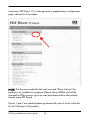
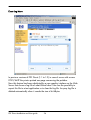
Macro PCL
Printer has the possibility to print a default or custom overlay (called PCL macro)
on the printed page of the message body.
Also in this case user has the possibility of choosing among three options:
1. Yes - Printer uses the default Oberon Service S.r.l. macro (overlay).
2. No - No overlay (macro) is used to print the message body.
3. Custom - User has the possibility to type in a PCL macro ID number which
will be the custom overlay used to print the message body.
NOTE: for option 3 custom PCL macros have to be added on the flash dimm.
Known problem with Microsoft Outlook 2000
Using Microsoft Outlook 2000 you’ll find an error when printing plain text
messages (the printer do not word wrap correctly). Please refer to Microsoft tech
note Q242388 on Microsoft Web and install the SR-1/SR-1a in order to fix this
error.
PDF Direct Installation and User guide
41