1
The Home Theatre Environment
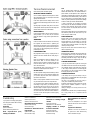
A Home Theatre system is illustrated opposite.
FRONT AND CENTRE CHANNELS
The front channel loudspeakers should be placed on either
side of the television screen, 2 to 3 metres apart. and rotated
slightly towards the listeners.
As the Centre speaker carries the dialogue effects, it should
be placed central to the listening position and close to the TV
screen.
Operating height is important. Ideally, the front and centre
channel speakers should be operated at the same height and
with the tweeters at ear level to a seated listener.
REAR CHANNELS
If the rear channels are WH 2 Surround units, mount them as
already described. If you use other units, we recommend
placing the speakers in a high position. angled towards the
listener.
SUBWOOFER
As the ear is unable to detect the direction from which deep
bass originates, this allows freedom in positioning the
subwoofer. Varying the distance from the wall will alter the
amount of bass. Some prefer to place the subwoofer against a
corner of the room. This arrangement gives more bass at the
possible expense of clarity.
LOUDSPEAKER SIZES
Many digital AV Processors require you to specify the size of
speakers in the various channels. These are usually ‘Large’ or
‘Small’.
Unless your loudspeakers are large floor standing units, you
should choose 'Small' for the Front channels, as the
subwoofer is going to be better at providing clean, deep and
louder bass. Choose 'Small' for the surround channels and
also for the Centre channel.
Set the ‘Subwoofer’ option on the processor to 'On' or 'Yes'.
This will route all the deep bass to the subwoofer.
SETTING LEVELS
Once the loudspeaker settings have been finalised, put the AV
amplifier into its “Test” mode (see instructions supplied with
your processor.) Adjust the levels until all channels are
reproduced at equal loudness.
NOTE: On some programme material the surround channel
may seem lower than the front. Do not readjust this level.
You may, however, need to adjust the subwoofer output level.
Avoid setting too high a level or you will swamp the sound
with bass which be tiring to listen to and may limit the
subwoofer’s ability to respond to large bass transients. Set a
sensible level going into the subwoofer from the AV processor.
The volume control on the subwoofer should be between 12
o’clock and 3 o’clock when the system as a whole is playing
moderately loudl
Troubleshooting
If your system is not working properly please
work through this checklist before returning
a unit to your dealer.
No Sound
System not switched on
Speaker cables shorting terminals out
Bass reproduction poor,
muddy or indistinct.
Subwoofer not switched on
Subwoofer phase incorrect
Subwoofer crossover set too low
Bass distortion at low volume
Subwoofer level set too high
LFE level set too high
Excessive or distorted bass at
high volume.
System level set too high
Bass control set too high
LFE
The Low Frequency Effects channel was designed as an
additional bass channel with its own dedicated subwoofer. In
practice however, if all the speakers are set to Small, the LFE
channel will be combined with the bass from other channels
and all this feeds into the subwoofer.When you set the LFE level
from your AV processor, use care with this setting as the LFE
channel may contain powerful low frequencies which, although
normal in a cinema, may overload a domestic subwoofer.
If, during a programme, you hear popping or thumping
noises coming from the subwoofer, immediately turn the AV
Processor's volume level down and then back off the LFE
level. If this does not cure the problem, back off the volume
level at the subwoofer.
Please read the relevant sections of your AV amplifier manual
and familiarise yourself with the various issues. If you are
unsure, consult your dealer for help.
MAINS OPERATION
When the system is not in use we suggest you switch off the
subwoofer to protect it from switching noises caused by
domestic appliances, etc. The best practice is to switch the
complete system on and off from a central point. If you play
the system with the subwoofer switched off no damage will
result but you will get no bass!
Always turn the main volume control to minimum when you
switch the equipment on or off.
CONNECTING WIRES
When wall mounting a loudspeaker the connecting cables may
be unacceptably obvious. It may be less obtrusive to route
cables from the loudspeaker to the ceiling and then within or
immediately underneath the ceiling or coving. The cable may
then return to floor level at a convenient room corner.
CARE AND MAINTENANCE
If you play the speakers with the grilles off exercise great
care. NEVER touch the drive units which are easily damaged.
The loudspeaker cabinets can be cleaned with a damp cloth
or with a spray furniture polish and a soft cloth. Apply the
spray sparingly to the cloth and then polish the cabinet.
Never apply spray directly to the cabinet.
GUARANTEE & SERVICE
In the unlikely even that your unit develops a fault you
should return it to your Wharfedale dealer using the original
packing to ensure safe shipping.
The terms of your guarantee may vary from country to
country but in all locations the guarantee excludes:
All damage caused through accident, misuse, wear and tear,
neglect, incorrect installation, adjustment or repair by
unauthorised personnel.
Liability for damage or loss occurring in transit to or from
the purchaser.
Wharfedale will not be liable for any consequential damage,
loss or injury, arising from or in conjunction with this
equipment.
Subwoofer too close to room corners
Distortion or rattling at high
volume
System level set too high
Objects placed on or near subwoofer
Popping sounds or thumps
from the subwoofer
System level set too high
Subwoofer level set too high
LFE level set too high
Poor localisation of effects or
dialogue
One or more loudspeakers is out of phase:
(Read the manual for the correct connection
procedure)
TV picture is distorted
Subwoofer is too close to the TV. Switch off
the system and TV. Move subwoofer away.
Leave 20 mins. Switch on again.