1
Touchpad
Use the Touchpad with your fingers. Using a sharp object may damage the
Touchpad.
The pictures in this manual may differ from the actual screenshots and the
appearance of the touchpad may differ depending on the model.
Basic Touchpad Functions
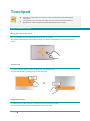
Moving the cursor on the screen
Place your finger on the touchpad slightly and move your finger.
The mouse cursor will move accordingly. Move your finger in the direction you wish to move the
cursor.
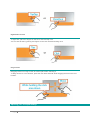
Click Function
To click on an item, place a finger on the touch area and tap once.
You can also do this by clicking once on the click area.
Double-Click Function
To select an item, place a finger on the touch area and quickly tap twice.
You can also do this by quickly clicking twice on the click area.