1
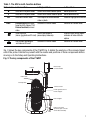
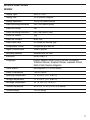
Table 1. The H16’s multi-function buttons
Button Label
In Preview Mode
In Playback Mode
In Menu Mode
▲
Switches to Playback mode
Selects next-oldest video or photo
Moves up one line
▼
Switches to Playback mode
Selects next-newest video or photo
Moves down one line
OK
Switches to Menu mode
Offers option to delete selected
video or photo
Executes highlighted command
ESC
Presssed briefly, enlarges
target by 50% (zooms 1.5X)
Pressed and held, mirrors
video
Switches to Preview mode
Switches to Preview mode
Takes a picture
Recalls next photo or
(stores .jpg photo on SD card) pauses/plays video clip
Displays repair data or opens
submenu of video attribute
options
Starts/stops recording an
.asf video on SD card
Switches to Preview mode
Switches to Preview mode
Fig. 2 shows the key components of the P16PIP. Fig. 3 details the anatomy of the camera-tipped
end of the probe. Familiarize yourself with the names and positions of these components before
moving on to the Setup and Operating Instructions.
Fig. 2. The key components of the P16PIP
Handle
Borescope
console holder
Reel frame
Coiled probe
Camera head
Probe guide/camera
head stopper
Reel stopper
Probe connector
(to borescope console
or handle/controller)
7