1
16
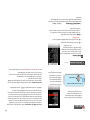
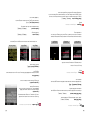
Show Remaining Videotime [ Don’t, hh:mm:ss, KB/s, both ] < Video Parameters
Displays a positionable OSD element to show the video bit-rate, and the remaining video
recording-time, on the SD card,…
• Don't - No display of remaining recording time and/or video data-rate.
• hh:mm:ss - Display a clock of remaining video-recording time left.
• KB/s - Display video recording bandwidth (data-rate) in Kilobytes per Second.
Display remaining video-recording time in both hours/mins/secs, and video
data-rate in Kilobytes per Second.
•
Both -
!
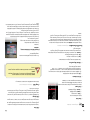
• Refresh Rate (~sec)
< Video Parameters < Main Menu
Due to the nature of video's variable bit-rate and compression methods, subject dependent,
the "Show Remaining Videotime" has to be updated regularly by re-polling the card-space
and the bit-rate to calculate a fairly accurate time-remaining estimate. Choose, in seconds,
how often that you want this Video-Recording time-remaining to be updated. Shorter periods
of time are less accurate from each on-screen update to the next.
!
!
!
!
!
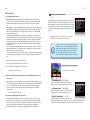
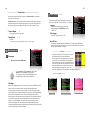
RAW Parameters
Save Raw
!
< Main Menu
Enable [•] / Disable [ ]
Enables the saving of RAW files. Enabling RAW does not
disable JPEG, both are saved. Also required for saving DNG.
!
Exceptions < Raw parameters < Main Menu
!
!
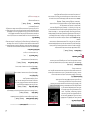
Enable [•] / Disable [ ]
• Disable @ Video Record?
Some cameras, the S-Series in particular, have a dedicated "Video Record" button where you can
engage that and also shoot individual still-frames during video recording. It was found that
RAW file-saving can interfere in this process. Turning this option on will ensure that you don't
miss a shot or video.
• Disable RAW @ Sports
Enable [•] / Disable [ ]
Disable RAW saving when the Mode-Dial is turned to Sports Mode. This ensures that fast action
sequences won't be missed due to RAW file-saving time, when forgetting to disengage the RAW
feature.
Enable [•] / Disable [ ]
• Disable RAW @ Burst
Disable RAW file-saving when using burst mode. Again, a handy override for when RAW is not
needed during fast burst-sequence shots (RAW enabled would certainly increase time between
shots)
Enable [•] / Disable [ ]
• Disable RAW @ Timer
Disable RAW file-saving when using the camera's Custom Timer mode (similar to the safety
feature for the burst mode).
57
@default f 0
@param g Pix-Step(speed/accuracy adj)
@default g 8
@param h Reg Mode(0-no,1-incl,2-excl)
@default h 0
@param i Measure Mode (1-Y,0-U,2-V)
@default i 1
@param j Burst/Preview (sec,0=off)
@default j 0
if a<1 then a=1
if b<1 then b=1
if c<0 then c=0
if g<1 then g=1
if f<1 then f=1
if j<0 then j=0
e=e*100
j=j*1000
print ">[";a;",";b;"] threshold: ";c
x=30000
if j>0 then goto "md_burst"
!:md_singleshot
press "shoot_half"
t=0
do
md_detect_motion a, b, i, x, d, c, 1, t, h, 1, 1, a, f, 0, g, e
until t>0
click "shoot_full"
goto "md_singleshot"
!:md_burst
press "shoot_half"
t=0
do
md_detect_motion a, b, i, x, d, c, 1, t, h, 1, 1, a, f, 0, g, e
until t>0
press "shoot_full"
let X=get_tick_count
!:contloop
let U=get_tick_count
let V=(U-X)
if V<j then goto "contloop"
release "shoot_full"
goto "md_burst"
----------------------------------------------------------------------------------------------------------------------------------------------------
http://chdk.wikia.com/wiki/UBASIC/Scripts:Lightning_script_--_Fudgey
See:- FAQ-How do I use scripts? Page 63
!
and:- Scripting Tutorial Page - http://chdk.wikia.com/wiki/UBASIC/TutorialScratchpad
!
!
also:- http://chdk.wikia.com/wiki/UBASIC/Scripts (Excellent)
!
!
Tip: For using intervalometer, and long exposure scripts - to save battery and LCD use a piece of "
round plastic in the camera video transfer port and LCD will be off, although not as much saving as when
display is turned off (Which may not be possible with some other settings).