1
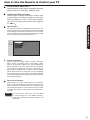
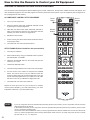
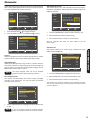
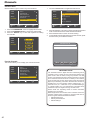
How to Use the Remote to Control your AV Equipment
Set-Top-Box/
Satellite Receiver
Device Button
Cable Device
Button
REMOTE CONTROL
MY CABLE BOX CODE IS:_____________________
NOTE
Refer to instruction manual of the Cable Box
for operation of the buttons exclusively for the
Cable Box.
MY SET-TOP-BOX/SATELLITE RECEIVER
CODE IS:_____________________
NOTE
Refer to instruction manual of the Set-Top-Box/
Satellite Receiver for operation of the buttons
exclusively for the Set-Top-Box/Satellite Receiver.
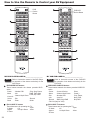
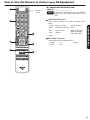
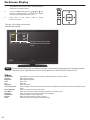
PRECODED CABLE BOX buttons
These buttons transmit the chosen precoded
cable codes :
-Power
-Cursor & Select
-Number PAD
-Menu
-Info
-Enter
-Exit
-Channel Up & Down
-Dash (-)
-Guide
-Last CH
-Fav CH
-Play, Stop, Pause, RWD, FWD, Skip
-Color Buttons
FWD, Skip RWD, Record.
PRECODED SET-TOP BOX/SATELLITE buttons
These buttons transmit the chosen precoded Set-TopBox/Satellite Receiver codes :
-Power
-Cursor & Select
-Number PAD
-Menu
-Info
-Enter
-Exit
-Channel Up & Down
-Dash (-)
-Guide
-Last CH
-Fav CH
-Play, Stop, Pause, RWD, FWD, Skip
-Color Buttons
FWD, Skip RWD, Record.
EXCLUSIVE TV buttons
These buttons are for operating the TV :
-Input
-P. Mode
-CC
-Mute
-Aspect
-Vol Up & Down
-E. Save
EXCLUSIVE TV buttons
These buttons are for operating the TV :
-Input
-P. Mode
-CC
-Mute
-Aspect
-Vol Up & Down
-E. Save
23