1
continue, etc), and perform the usual math and string operations. Of course, UNIX programs can
be called (exec). All of these facilities are available to any Tcl application. Tcl is completely de-
scribed by Ousterhout [3][4].
expect is built on top of Tcl and provides additional commands. The spawn command invokes a
UNIX program for interactive use. send sends strings to a process. expect waits for strings from
a process. expect supports regular expressions and can wait for multiple strings at the same time,
executing a different action for each string. expect also understands exceptional conditions such
as timeout and end-of-file.
The expect command is styled after Tcl’s case command which matches a string against a number of other strings. (Whenever possible, new commands were modeled after existing Tcl commands so that the language remained a coherent set of tools.) The following definition of expect
is paraphrased from the manual page [5]:
expect patlist1 action1 patlist2 action2 . . .
waits until one of the patterns matches the output of the current process, a specified time period
has passed, or an end-of-file is found. If the final action is null, it may be omitted.
Each patlist consists of a single pattern or list of patterns. If a pattern is matched, the corresponding action is executed. The result of the action is returned from expect. The exact string
matched (or read but unmatched, if a timeout occurred) is stored in the variable expect_match.
If patlist is eof or timeout, the corresponding action is executed upon end-of-file or timeout, respectively. The default timeout period is 10 seconds but may, for example, be set to 30 by the
command set timeout 30.
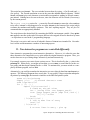
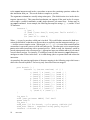
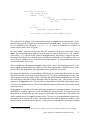
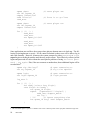
The following fragment is from a script that involves a login. abort is a procedure defined elsewhere in the script, while the other actions use Tcl primitives similar to their C namesakes.
expect "*welcome*" break \
"*busy*"
{print busy; continue} \
"*failed*"
abort \
timeout
abort
Patterns are the usual C-shell-style regular expressions. Patterns must match the entire output
of the current process since the previous expect or interact (hence the reason most are surrounded by the * wildcard). However, more than 2000 bytes of output can force earlier bytes to
be “forgotten”. This may be changed by setting the variable match_max.
expect actually demonstrates the best and worst of expect. In particular, its flexibility comes at
the price of an occasionally confusing syntax. The pattern-lists can contain multiple patterns except for keyword patterns (e.g., eof, timeout) which must appear by themselves. This provides a
guaranteed way of distinguishing them. However, breaking up the lists requires a second scan,
which can interpret \r and \n as whitespace if not correctly quoted. This is exacerbated by Tcl
providing two forms of string quoting: braces and double quotes. (If unambiguous, Tcl does not
require strings to be quoted at all.) There is a separate section in the expect manual page to explain this complexity. Fortunately, a healthy set of examples seems to have held back complaints.
Nonetheless, this aspect will be probably be revisited in a future release. For readability in this
paper, scripts are presented as if double quotes sufficed.
expect: Scripts for Controlling Interactive Processes
3