1
Then later, you can read this archive with:
vio
-ivndf
device
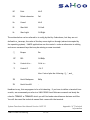
In the case of DOS machines, you specify the device as the drive name plus a disk type code
from the table below:
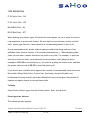
H 1.2 MB High-density 5.25”
3 1.44 MB High-density 3.5”
9 720 KB, 9-sector, low density 3.5”
8 320 KB, 8-sector, low density 5.25”
If you were reading the archive example above on a DOS machine with a 1.2 MB floppy, the
command would be:
vio -ivndf a:h
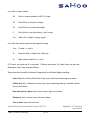
Vio has a number of options described below:
-b Block records during output, 10 records per block. A record is normally 512 bytes.
-c Force all files to be placed in the current directory during input, ignore directory
specifications on the archive.
-d Create any needed sub-directories during input.
-f Allows naming archive file in the next command-line argument instead of letting vio
use its standard input or output as archive file/device. This avoids rekeying file name
in multi-volume runs and is virtually required for DOS to name x: devices correctly.
-g Rings bell when new volumes needed.
System Functions User Manual Version 14.07.35
SAMCO Power Accounting
33.282
Appendix “A” Technical
Information