1
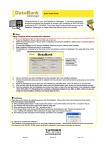
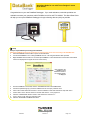
Quick Start Guide for use with Turner Designs C-sense pCO2 Sensor Advanced Calibration There are several options for calibrating sensors with the DataBank. Please refer to the User’s Manual for other options. Partial Pressure of CO2 in ppm 1) In the “Group Number” box, choose the parameter group from the pull down (same group number used in Setup step #5). 2) Type “ppm” in the “Units” box and press enter (output will be calculated in parts per million). 3) Confirm the “Title” box contains the title C-sense. 4) From the “Gain” pull down menu, select 1. 5) Obtain the calibration sheet that was sent with the C-sense instrument. 6) The slope value is in volts while the DataBank expects a slope value in millivolts, therefore you must divide the slope by 1000. The offset can be entered from the calibration sheet as is. You may now save these calibration values to the instrument following the steps below: In the “Interpretation Equation” box, 1) Select “mV”, for millivolt 2) Select “Dec.”, for decimal 3) Enter the y-intercept from the calibration sheet into the "Order 0 (Offset)" box and press enter. 4) Enter the calculated slope value from step #6 into the “Order 1 (Slope)” box and press enter. 5) Enter a “0” in the “Order 2” box and press enter, and a “0” in the “Order 3” box and press enter. The DataBank is now ready for use. You may shut down the GUI and begin measuring samples or go to the “Setup Options” tab and change settings. Values measured are stored in the DataBank’s memory as millivolt readings and converted to ppm concentrations. To log the data, press and hold the “STORE/LOG” button on the DataBank. The DataBank will display “LOGGING MODE ENTERED” and begin logging data to internal memory. www.turnerdesigns.com 998-2906 Revision B Page 2 of 2