1
APPLICATION NOTE 503
For this purpose we have to define the remanesp3.xml:
<?xml version="1.0" encoding="iso-8859-1" ?>
<configuration>
<module name="RemanESP3">
<!--
***************
General configuration
**************
-->
<data name="General configuration" type="group" />
<data address="0x80" name="Serial protocol" size="01" type="int" default="0xFF">
<description>Configure the protocol for the serial communication</description>
<enum>
<item value="0xFF">ESP3</item>
<item value="0x02">ESP2</item>
</enum>
</data>
<data address="0x81" name="Learn mode toggle time" size="02" type="int"
default="1000" formatstring="%d">
<description>Time [ms] after the output pin toggles during
the learn mode.</description>
</data>
<data address="0x83" name="Remote learn-in time" size="02" type="int"
default="2000" formatstring="%d">
<description>Time window [ms] within the PTM switch has to be
pressed 3 times to learn-in during remote learn.</description>
</data>
</module>
</configuration>
This XML reflects exactly the APP_CFG_AREA structure. Additionally it adds some comments
and formatting for the user.
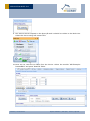
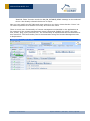
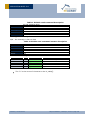
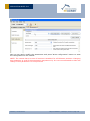
To use the defined XML we have to copy the file remanESP3.xml to the DolphinStudio\Configuration directory.
Then we can start the DolphinStudio and check the result:
© EnOcean | www.enocean.com
Subject to modifications | Jozef Hopko | June 2011 | Page 16/ 20