1
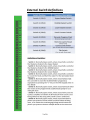
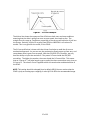
Figure 1 - S-Curve Example
The thicker line shows the response of the AC drive to both start and stop conditions
assuming that the drive is going from zero to some speed, then back to zero. The
straight lines for ramp up, ramp down, especially at the corners will add a lot of jerk into
the system. Basically, think of it as going from 0FPM to 1000FPM in a fraction of a
second. This is not good for the motor, or the ECHO.
The S-Curve profile that is shown with the thinner line helps to avoid the all at once
acceleration approach. As you can see, the acceleration slowly ramps up from zero, and
ramps down when it gets close to speed. With the GS1/GS2 VFD Controller, we only
have the ability to input the numbers 0-7 for preset S-Curves inside the GS1/GS2
controllers. The higher the number, the more sloped the S-Curve will be. This means
that an S-Curve of 7, will take longer to get to speed, but have a smoother ramp, than an
S-Curve of 2. The same S-Curve is applied to both the acceleration and deceleration of
the ECHO.
NOTE: This setting should be changed from its default (00) if the user notices that the
ECHO is jerky on starting up or stopping. A value of 01 to 04 is the recommended range.
17 of 33