1
1.4 Key Pad define & Text entry
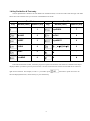
You use alphanumeric characters to enter details into the Phone Book, to create text and e-mail messages. The table
below shows the characters that you can enter in the different text modes.
Text Mode
Key
Normal (ABC)
Text Mode
Numeric (0-9)
Key
Normal (ABC)
Numeric (0-9)
1
pqrsPQRS
7
abcABC
2
tuvTUV
8
defDEF
3
wxyzWXYZ
9
ghiGHI
4
@ . _-*#()%&+∕$,
0
jklJKL
5
*
.
mnoMNO
6
#
#
In Normal and Numeric modes, each time you press in quick succession the next character available on that key in
displayed. When you did not press key for more then 1 sec the current character will be selected and cursor will move
right for next selection. For example, to enter “c” you need to press
enter the displayed character, release the key or press another key.
9
four times in quick succession. To