1
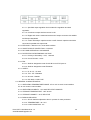
STANBY STATUS’.
+++
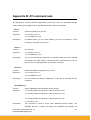
Function :
Make transition from ONLINE STATUS to STANDBY STATUS.
Response :
<cr><lf>OK <cr><lf>.
Description :
If you input ‘+++’ string to your SD in ONLINE STATUS, your SD goes into
STANBY STATUS. Once SD enters into STANDBY STATUS, you can use any
AT command sets supported by PromiTM-SD.
ATO<cr>
Function :
Make transition from STANBY STATUS to ONLINE STATUS.
Response :
None
Description :
This AT command is the counter operation of ‘+++”. You can change the
operating status to ONLINE STATUS again by using this command. In
ONLINE STATUS, the data can be transferred between two hosts. The
existence of your SD becomes transparent to any host applications which use
serial ports.
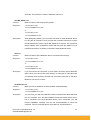
ATH<cr>
Function :
Release the current Bluetooth connection.
Response :
<cr><lf>OK<cr><lf>
<cr><lf>DISCONNECT <cr><lf>.
Description :
This AT command can be used for disconnecting the existing Bluetooth
connection.
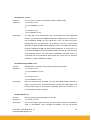
AT+BTSEC, Authentication, Encryption <cr>
Function :
Set Bluetooth authentication or encryption features selectively.
Response :
<cr><lf>OK<cr><lf>.
Description :
By using this AT command, you can set authentication or encryption feature of
your SD during Bluetooth connection process. Once you set authentication or
encryption features, your SD stores its status. To release authentication or
encryption features you set, you should use this AT commands or do softreset. To enable authentication or encryption, set authentication or encryption
parameter as 1. Otherwise set either of them as 0.
Promi-SD™ User Manual ver 1.3
www.BluetoothUpgrades.de
47