1
 TIMTER™ Multi-mode Digital Telemetry Transmitter
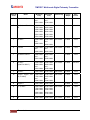
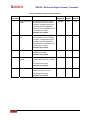
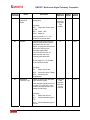
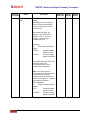
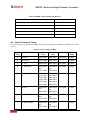
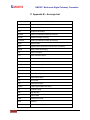
Mnemonic
Command
Name
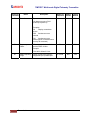
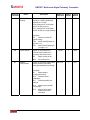
OC
Overtemperature
Control Enable
Description
Enables or disables
overtemperature control
Option (s)
Required
Setting
Saved?
Factory
Default
Standard
Y
OC 1
DP
Y
PL 0
Standard
N/A
N/A
Standard
N/A
N/A
Standard
N/A
N/A
OC 0 Disable Overtemperature
Control
OC 1 Enable Overtemperature
Control
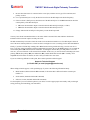
If the transmitter temperature
goes above the set limit stored on
the device and the current power
level is over 25, the transmitter
automatically starts to back off
power in 2 dB steps to a
maximum of 6 dB.
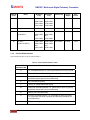
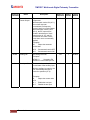
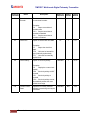
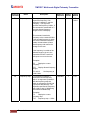
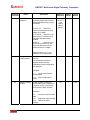
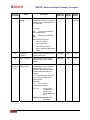
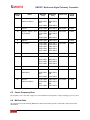
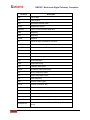
PL
Power Level
PL reports or sets the current
power level setting for the dual
power feature. If the user enters
1, the power level is set to current
“high” power level (refer to HP
command). If the user enters 0,
then power is set to the current
“low” power level (refer to LP
command).
Examples:
PL
Report the current power
level state
PL 0
Set the current power
level to “low”
PL 1
Set the current power
level to “high”
Disabled in Parallel Mode
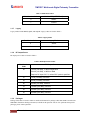
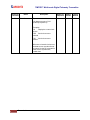
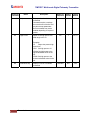
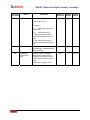
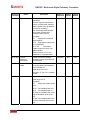
PR or RE
Restore Defaults
Restores factory default
parameters for the unit
Default is currently the lowest
number modulation supported by
the transmitter with the selected
band and frequency limits
Default power level is Full power
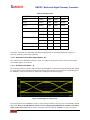
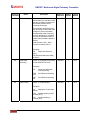
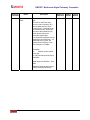
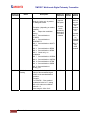
QA
Query All
Displays common device settings
in one compact display
Display is a subset of SS or ST
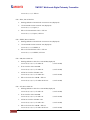
QT or TE
44
Query
Temperature
Quasonix, Inc.
Report the temperature in
degrees Celsius