1
XI Soil texture management
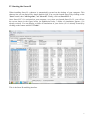
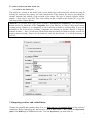
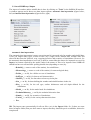
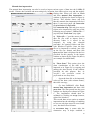
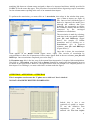
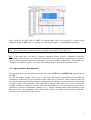
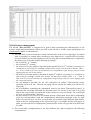
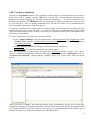
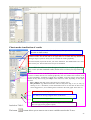
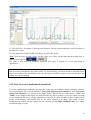
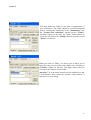
The sub-tab "Plot and Soil" is composed of a grid of data representing the characteristics of soil
textures usable during simulations. When you click on the sub-tab, a window opens and displays two
complementary tables, as shown below:
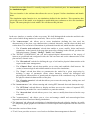
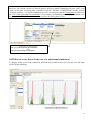
1) The first table is used to define the textural characteristics of the soil (soil typology), in relation
with its capacities to contain water according to two depth levels: a superficial level (surface
reservoir) and a level of depth (depth reservoir covering the soil portion that can be explored by
the plants roots). This table enables defining (by typing) :
o the soil Id (Id), (1st column),
o the soil name (2nd column),
o the stock of soil water usable by the plant in the superficial level (3rd column), at sowing (it is
considered as null (0.00) for seedlings without roots (seeds), but must have another value >
or = 0.00, in link to the level of soil moisture for transplanted crops having roots for water
tapping from the soil, at the outset),
o the stock of soil water usable by the plant in depth (4th column), at sowing (it is considered as
null (0.00) for seedlings without roots (seeds), but must have another value > or = 0.00, in
link to the level of soil moisture for transplanted crops having roots for water tapping from
the soil at the outset),
o the soil thickness favorable for the soil evaporation on surface "EpaisseurSurf (mm)"
(generally fixed at 20 cm ( 200 mm for typing into the model) for sandy soils and less for
clay soils),
o the soil thickness containing the consumable water by the plant "EpaisseurProf (mm)". It
represents the soil depth achievable by the plant roots. For cereals, it can reach 2 m (2,000
mm) in the case of sandy soil and below when it comes to a clay soil texture. For a soil depth
of 1.8 m, we will consider 1,800 mm,
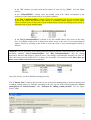
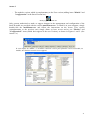
o the last column is not reserved to any manual process of data input, but it allows establishing
a link (by correspondence) with the complementary information registered in the 2nd table
below, for each soil type. For this, we must make two separate clicks (different from doubleclick) in the box corresponding to the selected soil type. A scrollable window will appear to
allow you select the Id of complementary characteristics of the soil type that is located in the
2nd table.
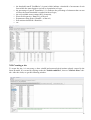
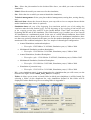
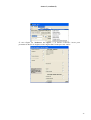
2) The second table (complementary to the first) indicates the values assigned to the following
soil parameters :
18