1
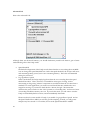
Because TraQr Manager calls on Flight to generate the MQD files, the current Sensor configuration has a significant effect on the way flight recordings are generated. Most users will be satisfied with the default configuration and won’t need to change anything. Advanced users may wish to run Flight and change the Sensor configuration to add or remove sensor values. The default sensor configuration enables the following: Flight recording trigger GPS Altitude GPS Latitude GPS Longitude GPS Satellite count GPS HDOP GPS Vehicle speed GPS Distance GPS LatG GPS LongG GPS Track made good GPS Seconds past midnight UTC GPS Road power This is the configuration most customers need. You can add the less-common sensors, such as GPS Turn Radius, by running Flight and tapping Config > Sensors. Please refer to the chapter on Flight for more information on changing the Sensor configuration. This needs to be done during a live connection to the TraQr (with the switch in the NAV position). Refer to the Sensor Reference at the end of this manual for technical details about each sensor. Flight Recording Trigger By default, the TraQr records data when the car is going at or above the speed threshold. Below the speed threshold, no data is recorded. If the car’s speed keeps going above and below the threshold, you will get data with gaps in it, which is to be expected. The Flight Recording Trigger works differently. It turns on at the StartSpeed threshold, and the first thing it does is write out the 25 seconds worth of data before the StartSpeed threshold was exceeded. Then it keeps recording until the car’s speed slows to below the StopSpeed threshold for more than a specified amount of time, the OffDelay. The average user doesn’t need to be concerned with this subtle difference, but the advanced user may need to understand it. The key is to remember that the TraQr records data only above the speed threshold, and this data is then processed a second time through the Flight Recording Trigger. For example, if the speed threshold for the TraQr is 20 MPH, the StartSpeed for the Flight Recording Trigger is 60 MPH, and the car exceeds 20 MPH but never exceeds 60 MPH, you will get no MQD files after downloading, because the Flight Recording Trigger was never triggered. On the other hand, if you use the ‚Log regardless of speed‛ mode for the TraQr and then use the default calibration for the Flight Recording Trigger, you will get a series of MQD files, one for each time the 45