1
Easylon Mini PCIe Socket Interface User Manual
Installation
Installation for different operating systems is described in the following sections.
Windows operating systems
section 2.2.1
Windows CE
section 2.2.4
16-Bit driver under 32-bit Windows
section 2.2.2
This section also describes in short the diagnosis utility „EasyCheck“ which can
be installed separately from CD.
2.2.1
Driver for Windows Operating System (WDM Drivers)
This section describes installation and setup of the Easylon Interface card drivers
for the Windows operating system from XP onwards.
The setup program is using the same WDM driver (Windows Driver Model) for
all Windows operating systems.
Note:
For installation you can either use the Windows assistant or the program
FastUpd.exe for manual installation, which is much more straightforward (cf.
chapter 2.2.1.2).
The latter is especially helpful if you are running Windows 7 and later or have to
install several instances of the driver.
2.2.1.1
Installation
Insert the “Drivers & Documentation” CD into the drive of your PC with the
module plugged into the desired socket.
LPD/UserDoc/LPD-Manual-EN-v1.2.docx v1.2, 07/02/14
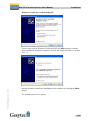
The PC will show that a new USB device has been found. Windows will automatically start the hardware wizard.
10/27