1
Introduction
Page 1
Introduction
CASCA is an interactive program for the creation of two-dimensional continuum finite
element meshes. Its capabilities include three- and six-noded triangles and four and eightnoded quadrilaterals.
This manual is intended to be a simple description of the basic features of CASCA. It
includes a brief tutorial, hints on addressing common problems, and menu descriptions.
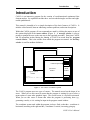
Within the CASCA program, all user commands are made by clicking the mouse on one of
the options displayed in the menu window (Figure 1). A message window is always
present to prompt the user on the next step in the requested procedure. Entry into CASCA
and I/O operations invoked during the running of CASCA are made from the program
control window. This is the window from which the program was started. An auxiliary
window is used for attribute definition.
auxiliary window
title window
command options
program control
window
$casca
Big window or small (b,s):s
operations
window
menu
window
message window
Figure 1: The CASCA window system
The CASCA program uses two types of cursors. The normal cursor has the shape of an
arrow. When you see this cursor it means that the program is waiting for you to select a
menu option or some other graphical input. The second cursor is a stylized wristwatch.
When you see this cursor it means that either the program is processing data (e.g.,
generating a mesh), or it is waiting for input in the program control window.
The coordinate system used within the program is always fixed so that the x coordinate is
horizontal, increasing to the right and the y coordinate is vertical, increasing going up.
CASCA User's Manual