1
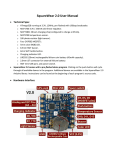
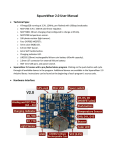
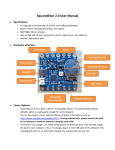
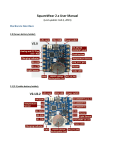
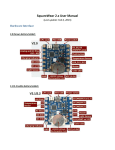
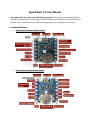
Technical Spec o o o o o o o o ATmega328 running at 3.3V, 12MHz, pre-flashed with USBasp bootloader. MCP1700 3.3V / 250mA LDO linear regulator. MCP73831 lithium charging chip (configured to charge at 35mA). MCP9700 temperature sensor, 10K photo-resistor (light sensor). 5mm color (RGB) LED, 8.5mm SMT buzzer, 6mm SMT tactile button. LIR2032 (20mm) rechargeable lithium coin battery (45mAh capacity). 2.0mm JST connector for external lithium battery. Four BSS138 MOSFETs, SMT mini-USB port, and power switch. Power Options (IMPORTANT!!! Please READ!!!) o SquareWear 2.0 has a built-in 45mAh rechargeable lithium coin battery (LIR2032). Every time you plug in the mini-USB cable, it charges the battery automatically. Do NOT use it with non-rechargeable batteries such as CR2032. o You can also power SquareWear by an external Lithium-Polymer (LiPo) battery (such as http://rayshobby.net/cart/accessories/acc-batteries/lipo-700). When using external LiPo, please remove the built-in coin battery. o To remove the built-in LIR2032, carefully push back the metal tap on the battery holder, until you can lift the battery up. DO NOT force lifting the battery as it may break the battery holder. If it ever breaks, use some hot glue to fix it back in place. o The build-in lithium charger (MCP73831) is set to charge at 40mA per hour (the charging current can be modified by changing a resistor). This will fully charge the coin battery in 1 hour. The charging time for external LiPo varies depending on the battery capacity. The green indicator LED will turn off when battery is fully charged. o SquareWear has a built-in LDO (MCP1700) to provide regulated 3.3V from battery. When battery voltage drops below 2.7V, the microcontroller will stop running. In this case, you should plug in a USB cable and charge the battery for 15 minutes before using it again. o Keep battery plugged in at all times. Certain functionality, such as buzzer and USB bootloader, may not work reliably if the battery is removed. Pin Names and Functions (SquareWear uses the same pin names as Arduino) o Digital I/O pins: the board has 8 available digital I/O pins D0 / D1 (also serial RX / TX pin) D3 / D5 / D6 (MOSFET pins***, support PWM*) D10 / D11 (support PWM*) D13 (internally wired to blue LED**)