1
External Connection
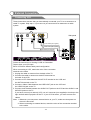
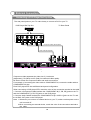
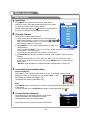
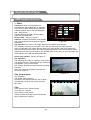
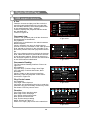
Connecting VCR
These instructions assume that you have already connected your TV to an antenna or a
cable TV system. Skip step 1 if you have not yet connected to an antenna or a cable
system.
VCR Rear Panel
ANT ANT OUT S-VIDEO VIDEO OUT AUDIO OUT
Side panel
5 Audio Cable (Not supplied)
4 Video Cable (Not supplied)
3 RF Cable (Not supplied)
VID EO
AU DIO
V GA/P C I N
AV 2 I N
R
R
L
Y
VI DEO2
PB
PR
L
VI DEO
SP DIF
OU T
PC AUD IO
IN
AV OU T
AV1 IN
Follow the instructions in Viewing a VCR or Camcorder
Tape to view your VCR tape.
Each VCR has a different back panel configuration.
When connecting a VCR, match the color of the connection
terminal to the cable.
1. Unplug the cable or antenna from the back of the TV.
2. Connect the cable or antenna to the ANT IN terminal on
the back of the VCR.
3. Connect an RF Cable between the ANT OUT terminal on the VCR and
the ANT IN terminal on the TV.
4. Connect a Video Cable between the VIDEO OUT jack on the VCR and
the VIDEO IN jack on the TV.
5. Connect Audio Cables between the AUDIO OUT jacks on the VCR and the AUDIO L and
AUDIO R jacks on the TV.
If you have a mono (non-stereo) VCR, use a Y-connector (not supplied) to hook up to the
right and left audio input jacks of the TV. If your VCR is stereo, you must connect two
cables.
Note: 1. Whenever you connect an external device to your TV, make sure that power on
the unit is turned off.
2. When connecting an external device, match the color of the connection terminal
to the cable.
17