1
ATMOSPHERIC WATER GENERATOR
3. OPERATIONAL STAGE
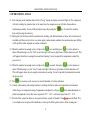
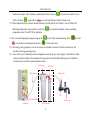
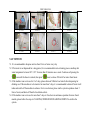
3.1. First time plug in the machine there will be a “beep” sound, the display screen will light on. The compressor
will start working two minutes later, at the same time, the compressor icon will show the machine is
functioning normally. To turn off the machine, keep soft pressing the “
” key. To restart the machine,
keep soft pressing the same key.
3.2. During the first few hours after the machine start working, with limited amount of water, hot & cold water is
available until the water level rise to a certain point ( under normal condition, the machine takes one full day
to fill up all the tanks, depends on weather condition).
3.3. When the machine has enough water, soft press the “
” icon, and then press “
” to select options to
adjust. When heating is on, the “Hot” in red color light will turn on, light turns off when function is off. This
will happen when there is enough water and start heating. It won’t stop until the temperature reached the
pre-set level.
3.4. When the machine has enough water, soft press the “
” icon and , then press “
” to select options to
adjust. When heating is on, the “Cool” in red color light will turn on, light turns off when function is off.
This will happen when there is enough water and start cooling. It won’t stop until the temperature reached
the pre-set level.
3.5. The “
” key locating on the screen is to select Fahrenheit or Celsius indication.
3.6. Usually, when heating and cooling function is working, the hot & cold water temperature will maintain
within the pre-set temperature range. Temperature can adjust by soft press “
” then make adjustment on
preferred temperature level. Hot water range from 75℃~95℃, cold water range from 4℃~10℃。
3.7. After the filter system has been use for a period of time, usually 24 months. The
icon will flash. This
is to remind owner to replace RO membrane or clean up the filters (please refer to filter cleaning and
15