1
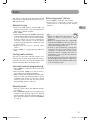
0LAYMODEALLDISCSEXCEPTJPEG
1. While the disc is playing, press the INFO button
twice for a CD and three times for a DVD.
2. Select the Play Mode icon using the left/right
arrow buttons.
3. Use the up/down arrow buttons to select an
option.
s $6$ PLAY MODES STANDARD PROGRAM !"
repeat, title repeat, chapter repeat. Program
play mode is only available if a program
list has been created (see below). Repeat
mode is only available with discs that display
elapsed time and remaining time. To repeat
a sequence between points A and B, choose
the A-B repeat option, and then follow the
instructions for entering the two points.
s!UDIO #$ PLAY MODES STANDARD INTROSCAN
random, program, repeat A-B, repeat disc,
repeat track.
4. To stop repeat playback, select the Play Mode
icon and use the up/down arrow buttons to
choose the Standard option.
Creating a Program List for
Program Play Mode
(Audio CDs and DVD discs)
To use program play mode, you must first create
a program list.
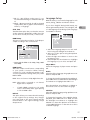
1. To create a program list, press the INFO
button twice for CD and three times for DVD.
Highlight the Play Mode option and press the
up arrow to select the Program option.
0RESS/+4HE0ROGRAMSCREENISDISPLAYED
3. The first spot in the list is highlighted. Use
the number buttons on the remote to enter
a track number. As for DVD discs: T stands for
Title while C stands for Chapter.
4. Use the arrow buttons to move to the
NEXT SPOT IN THE LIST %NTER THE NEXT track
number.
5. Continue entering tracks until you have
completed your list.
6. Highlight the Play option at the bottom of
THE SCREEN AND PRESS /+ OR PRESS 0,!9 TO
start playback. The program list will play in
the order you programmed it.
To stop program play, press STOP or select
Standard from the Play Mode option in the
INFO display.
If you want to cancel the list, repeat steps 1 and
TOSELECT#,%!2ANDPRESS/+
Bookmark (DVD and audio CD)
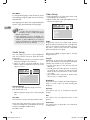
1. Press INFO twice for CDand three times for
DVD. Select the Bookmark icon with the
LEFTRIGHT BUTTONS AND PRESS /+ ! MENU IS
displayed with five bookmarks.
2. The first bookmark space is highlighted. Press
/+ TO SET THE BOOKMARK 4HE BOOK MARK IS
saved and is indicated by the number 1. You
can set up to five bookmarks on a disc.
3. To start playback from a bookmark, press the
PLAY button on the remote.
4. To delete a bookmark, highlight it and press
CLEAR.
EN
Note: This function is only available
with discs whose elapsed time or
remaining time appears in the Info menu.
Sleep
1. Press INFO twice for CD and three times for
DVD. Select Sleep icon with the left/right
arrow buttons.
2. Select one of the available options using the
/+BUTTON/FFORMINUTES
Note: This function is not available
in AUX, TUNER and COAXIAL
mode.
Introscan (CD)
This option plays the first ten seconds of each
track on a CD.
1. Press the INFO button twice, then select
the Playmode icon with the left/right arrow
buttons.
2. Press the up/down arrow buttons to select
THE ).42/ OPTION AND PRESS /+ TO START
IntroScan.
3. Press STOP to stop Introscan, and press PLAY
to resume normal playback.
13
RCA RTS202 ib.indd 13
6/6/2008 11:07:37 AM