1
Making Connections
You can connect your camera to: TV, computer, or a printer.
Connecting the Camera to a TV
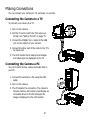
To connect your camera to a TV:
deo
A
1. Turn on the camera.
2. Set the TV out to match the TV’
s video out
format. See “
Setting TV Out”on page 79.
3. Connect the USB/AV 3-in-1 cable to the USB
port on the bottom of your camera.
4. Connect the other end of the cable to the TV’
s
AV input port.
5. The LCD monitor turns black and all images
and video clips are displayed on the TV.
Connecting the Camera a PC
You can transfer photos, videos and audio files to
your PC.
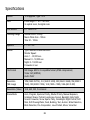
1. Connect the camera to a PC using the USB
cable.
2. Turn on the camera.
3. The PC detects the connection. The camera’
s
internal memory and memory card display as
removable drives in the file manager. No
image is displayed on the LCD monitor.
81