1
iCharger Synchronous Balance Charger/Discharger
106B+
Special modes program
Electric motor drive
You can easily break-in new brushed electric motors using a variable voltage and running time. Note that
the iCharger cannot directly drive brushless DC motors and that brushless motors do require or
benefit from a breaking-in process. With this function you also check the motor performance to optimize
your power-train. The break-in process is essential for maximizing the power of a new brushed motor. New
motors have square brushes which press up against the curved commutator. The goal for the break-in
process is to gentle shape the brushes so that they develop a curved surface that fits snugly against the
commutator giving greater conducting surface area and hence lower losses and higher efficiency.
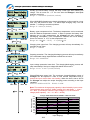
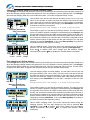
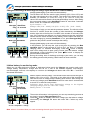
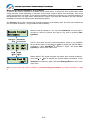
MOTOR DRV
8.0A
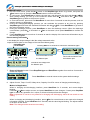
The value on the right side of the first line sets the test duration in minutes.
The second line shows the upper limit of current on the left and drive
voltage on the right. After setting the current and voltage press Start/Enter
for more than 3 seconds to start the next process. A beep tone will sound.
Test time: 1 – 90 min, Current: 0.05 – 10A, Test voltage: 1 – 15V
10min
2.0V
+
+
Dec Inc
Dec Inc
Batt type Start/Enter
Stop >3 seconds
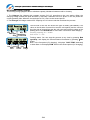
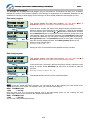
MOTO 1.9A
DRV 00310
2.05V
3.8W
work
drive
power
state
capacity
or time
drive
drive
motor
current voltage
test
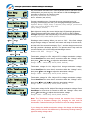
Status display. The top line shows the drive current and voltage. The
second line shows the output capacity (mAh) and in the lower right corner
alternately displays the output power or total run time. You can stop the test
at any time by pressing Batt type/Stop.
Foam-Cut drive
In this mode, the charger acts as a convenient power supply for a hot wire foam cutter.
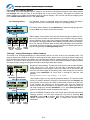
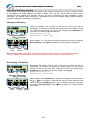
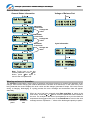
FOAM CUT
5.0A
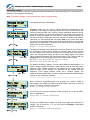
The value on the right side of the first line sets the run duration in minutes.
The second line shows the upper limit of current on the left and foam cut
voltage on the right. After setting the current and voltage press Start/Enter
for more than 3 seconds to start the process. A beep tone will sound.
Runing time: 0– 90 min(0 refers to stopping the process by yourself )
Current: 0.05 – 10A, voltage: 1 – 25V
10min
10.0V
+
+
Dec Inc
Dec Inc
Batt type Start/Enter
Stop >3 seconds
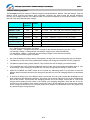
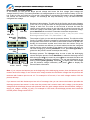
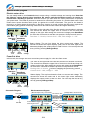
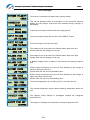
Status display. The top line shows the foam cut current and voltage. The
second line shows the state and in the lower right corner alternately
displays the output power or total run time. You can stop the test at any
time by pressing Batt type/Stop.
FOAM 5.0A 8.00V
CUT RUN>> 01m:10
Foam
state or
power
cut
set voltage or time
drive
drive
current voltage
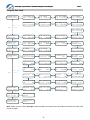
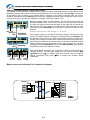
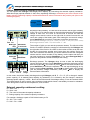
Schematic Diagram
Work statement diagram
Ext- switch
Output
Foam cut
Hot wire
iCharger
OFF/ON
(Buzzer beeps every 10 seconds)
FOAM 5.0A 8.00V
CUT RUN>> 001:10
*Press START to toggle
*Running time over
*Press START
to toggle
FOAM 0.0A 0.00V
CUT STOP 000:00
*Ext-switch: OFF
*Connect: OFF
*Ext-switch: ON
*Connect: ON
(Voltage falls to around 0.5V)
FOAM 0.0A 0.50V
CUT DOWN 000:00
*Press INC/DEC
*No operation
for 3 sec
FOAM 5.0A 8.00V
CUT 8.1V 001:10
(Voltage step size: 0.1V)
-22-