1
PDI-P10LCD USER MANUAL
Document Number PD196-058R3
Control Panel
9
DIRECT ENTRY
KEYPAD
POWER
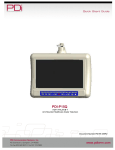
The easy to clean membrane control panel located on the lower front of the TV
contains 9 large easy to read buttons and a numbered “direct entry” keypad for
both channel and cursor control. The 5 lower buttons are used to turn the TV ON
or OFF, change channels and raise or lower the sound volume.
If the speaker is currently programmed as “OFF” in the current service level (see
the section following on “Power-On Channel and Speaker”), the message “Speaker
Disabled” will be displayed if either volume button is pressed while no earphone is
connected.
In addition to the Channel Up and Down buttons, the numbered “direct entry”
keypad may be used to directly enter the channel desired for viewing. If the
channel entered using this keypad is not programmed in to the current Service
Level (see sections following on “Service Levels” and “Channel Setup”), the symbol
“[X]” will be displayed in red in place of the channel number, and the channel will
not change.
The “2”, “4”,”6” and “8” buttons on the direct entry keypad are also used for cursor
positioning on televisions used in computer control applications.
The “feature” and “enter” buttons allow the patient to self rent the television.
The “cc” button alternately activates and deactivates program closed captioning.
Note: Not all programs offer closed captions. Pressing the button may not result in
the display of any captions.
The “mute” button will mute the TV audio. The word “MUTE” will then appear on
screen. Pressing the button again or pressing the volume up or volume down
buttons will enable the TV audio and remove the word “MUTE” from the screen.
BUTTON FUNCTION SUMMARY
POWER
Turns the TV ON or OFF.
VOLUME
Increase or decrease the TV volume.
CHANNEL
Changes the viewed channel up or down.
ENTER
Used in computer-controlled applications.
MUTE
Mutes TV audio.
CC
Activates or deactivates closed captions.
FEATURE
Activates self rental or computer controlled
system instructions.
NUMBERS
Direct channel entry.
PDI Communication Systems, Inc.
Phone 937-743-6010
40 Greenwood Lane
Fax 937-743-5664
Springboro, Ohio 45066
email: pdi@pdiarm.com